

The digital product market is booming, and eBooks remain one of the most profitable ways to monetize your knowledge and creativity in 2026. With over 1 billion eBook readers worldwide and the revenue in the eBooks market in the world is projected to reach US$15.14bn in 2026, selling eBooks has become a highly lucrative opportunity.
While platforms like Amazon and Apple Books are popular, Shopify offers a unique advantage: complete control over your store, pricing, and customer relationships. You can sell directly to your audience, deliver instant downloads, and create a scalable passive income stream without relying on third-party marketplaces.
In this guide, we’ll show you step by step how to sell eBooks on Shopify, from setting up your store and uploading products to optimizing pages, marketing effectively, and maximizing revenue. Whether you’re a first-time seller or looking to expand your digital product business, this 2026 guide covers everything you need to start selling eBooks successfully.
Why Selling eBooks on Shopify Is Profitable?
Selling eBooks on Shopify has become one of the most attractive digital business models in 2026, and for good reason. Unlike physical products, eBooks require no inventory, shipping, or storage costs, which dramatically reduces overhead. Once created, an eBook can be sold repeatedly without additional production expenses, creating a near-passive income stream.
Low Startup Costs
Starting an eBook business on Shopify doesn’t require a huge investment. You only need:
A Shopify account
A well-formatted eBook file (PDF, EPUB, or MOBI)
Optional tools for marketing, design, and automation
With monthly Shopify plans starting as low as $25, this is a cost-effective way to launch a digital storefront that can scale quickly.
Complete Control Over Sales and Pricing
Unlike marketplaces like Amazon, Shopify gives sellers full control over pricing, promotions, and discounts. You can run special offers, limited-time bundles, or subscription-based eBook memberships without sharing revenue with a third-party platform.
Direct Relationship With Your Customers
Shopify allows you to collect email addresses and customer data, giving you the ability to market future eBooks, courses, or digital products directly. This direct connection not only increases repeat purchases but also builds a loyal audience, something marketplaces often restrict.
Scalable Passive Income
Once your eBook is live, Shopify enables automated delivery using apps like Digital Downloads, SendOwl, or Sky Pilot, meaning your store can generate sales 24/7 without manual intervention. Combine this with effective marketing, and you can scale to hundreds or thousands of sales per month.
Expanding Global Market
With the rise of e-readers, tablets, and smartphones, eBooks are accessible worldwide. Shopify supports international payment gateways and multi-currency setups, allowing you to sell globally without complex logistics.
In short: selling eBooks on Shopify is profitable because it combines low overhead, direct customer access, automated delivery, and global reach—making it one of the most effective ways to earn passive income in the digital economy.
Start a free trial and enjoy 3 months of Shopify for $1/month
🚀 Start Shopify TrialTrusted by over 2,000,000 businesses worldwide
How To Sell eBooks On Shopify: A Detailed Guide
1. Preparing Your eBook for Sale
Before you upload your eBook to Shopify, it’s essential to prepare your digital product carefully. A well‑prepared eBook not only offers a better reading experience but also reflects professionalism — which can directly influence sales, customer satisfaction, and long‑term credibility as a creator. Here’s a detailed step‑by‑step breakdown of what you need to do before you list your eBook for sale:
Choose Appropriate eBook File Formats
Before you upload your digital book, you need to convert your manuscript into a downloadable eBook format. Several file types exist, each with its own strengths and compatibility:
PDF (Portable Document Format): A universally recognized format that preserves your book’s layout exactly as designed. It’s easy to create with word processors and is supported by virtually all computers, tablets, or phones. However, unlike some formats, text doesn’t automatically adjust to different screen sizes. This fixed layout makes PDF particularly useful for books where design and formatting matter (like workbooks or formatted guides).
EPUB (Electronic Publication): Considered the modern standard for eBooks, EPUB files allow reflowable text, meaning the content dynamically adjusts to the reader’s screen size — whether it’s a phone, tablet, or eReader. This adaptability makes EPUBs more reader-friendly on various devices.
MOBI / AZW: These formats are traditionally associated with Kindle devices. If you plan to sell your eBook beyond Shopify — for instance on Kindle — you may want to offer MOBI or Amazon’s proprietary formats (AZW/AZW3). However, for direct downloads from your Shopify store, they’re generally unnecessary.
While you’re not confined to only one option, offering multiple formats can make your eBook more accessible. For example, you can package various versions (PDF, EPUB, etc.) into a ZIP file that buyers download after purchase.
Why PDF Works Well for Shopify
For direct sales through your own store, PDFs are often the easiest and most practical choice. They don’t require specialized eReader apps — customers with a basic device or even a web browser can open them immediately. Most word processing or desktop publishing tools allow you to export your book as PDF with minimal effort, eliminating the need for extra conversion software.
Unlike formats with reflowable text (like EPUB), a PDF’s fixed layout doesn’t adapt to mobile screens automatically. While this can make reading on smaller devices slightly less fluid, the trade‑off is maximum compatibility and simplicity for your audience.
Offer Multiple Formats if You Want
You’re not limited to selling just one format. Many Shopify sellers choose to provide their book in more than one file type to accommodate different reader preferences. For example, offering both PDF and EPUB gives customers the freedom to read on their preferred device without compatibility issues. Some sellers bundle these multiple formats together in a ZIP file, making it easy for buyers to download everything at once.
Converting between formats is also possible with tools like Calibre or Adobe Acrobat, should you want to expand distribution later.
2. Design a Professional Cover
Your eBook cover is often the first impression potential buyers see — even before the title or description. A polished, professional cover attracts attention, reinforces brand credibility, and signals quality. Consider professional design tools like Canva or hiring a graphic designer to ensure your cover:
Is eye‑catching even at thumbnail size
Clearly conveys your topic or genre
Uses high‑contrast, readable fonts
3. Structure the Interior for Readability
Even after formatting to the right file type, your internal layout should be reader‑friendly:
Consistent styles and fonts: Use readable fonts with consistent paragraph spacing to make the content easy on the eyes.
Table of contents and chapter breaks: Especially for longer eBooks, this helps readers navigate and provides a professional touch.
Device compatibility testing: Preview your eBook on multiple devices — phones, tablets, and computers — to ensure spacing and layout look clean.
This step helps avoid distracting formatting issues that can frustrate buyers.
Setting Up Your Shopify Store
Setting up your Shopify store is the foundation of successfully selling eBooks online. The process is straightforward and user‑friendly, even if you’re new to ecommerce — and typically can be completed in a few hours from start to finish. The goal is to create a store that looks professional, accepts payments securely, and delivers digital products automatically after purchase.
Create Your Shopify Account
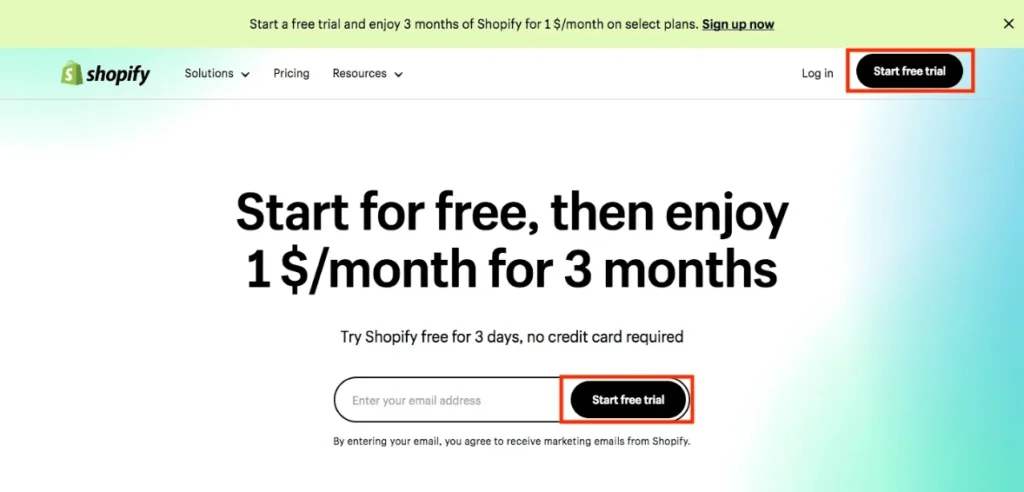
The first step is to sign up for a Shopify account. Shopify offers a 3-day free trial, which doesn’t require a credit card to explore its functionalities. When your free trial wraps up, you’ll have the option to continue with an exclusive deal: three months of access for only $1 per month, (Click This Link to Avail This Offer)choose a pricing tier that matches your business needs — most digital sellers begin with the Basic plan, which provides all the core functionality required to sell eBooks online.
During signup, you will choose:
Your store name
Default currency
Contact details and business information
This will form the backend of your Shopify store dashboard.
Customize Store Settings and Appearance
Once your account is created, you’ll want to customize your store so it looks trustworthy and aligns with your brand — even before you add your first product. Shopify’s theme library includes many mobile‑friendly ebook themes suitable for digital storefronts. Free options such as Dawn are clean, fast, and easy to set up.
Navigate to Online Store → Themes to:
Select a theme
Customize colors, fonts, and layout
Upload your logo
Set up navigation menus
Basic pages like Home, About, Contact, Privacy Policy, and Refund Policy also help build credibility and trust with buyers.
Start a free trial and enjoy 3 months of Shopify for $1/month
🚀 Start Shopify TrialTrusted by over 2,000,000 businesses worldwide
Install a digital downloads app
When it comes to selling ebooks on shopify, Shopify handles downloads a bit differently than many other ecommerce platforms. Instead of treating digital goods the same as physical inventory, Shopify requires you to install a digital downloads app from its App Store before you can deliver eBooks, guides, or other downloadable files to customers. This does mean a little setup up front, but it also gives you more flexibility in how downloads are fulfilled and managed.
A Few Extra Steps — But More Control
Unlike some builders that let you upload digital files directly when creating a product, Shopify separates the product listing from the file delivery mechanism. That means before your customers can download a purchased eBook, you’ll need to choose and install an app designed for digital delivery. It does add a small amount of configuration, but it gives you choices in terms of features like download limits, delivery timing, and file security.
Choosing the Right Digital Downloads App
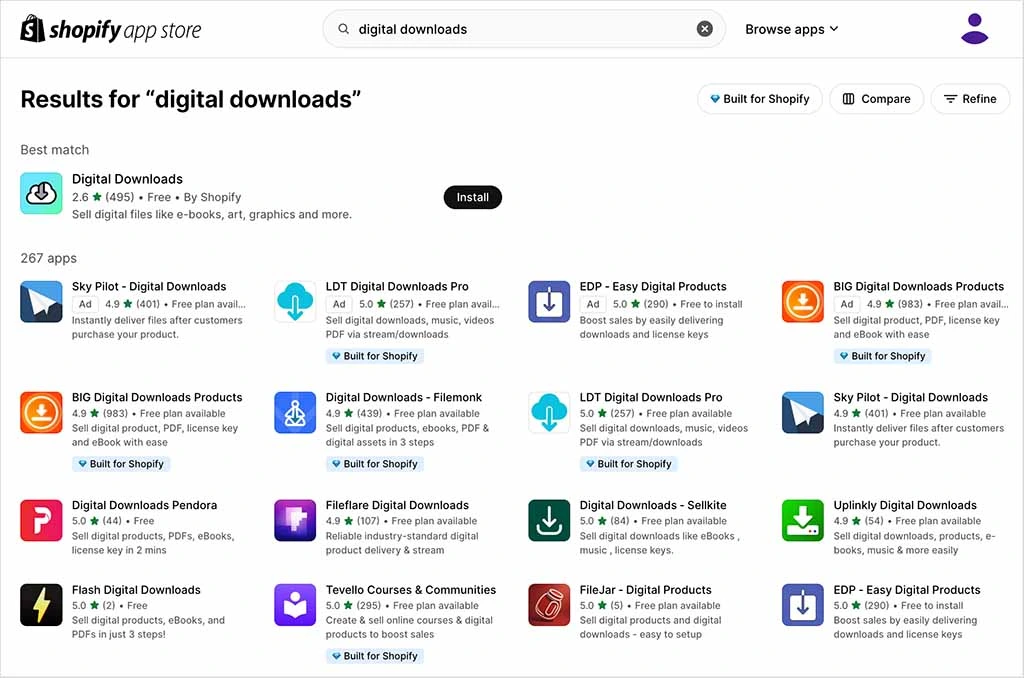
To begin, open the Shopify App Store and search for “digital downloads.” You’ll see a variety of options — both free and paid — that support selling PDFs, eBooks, audio files, videos, and more.
Shopify’s Digital Downloads app: A free, simple option that integrates directly with your store. It allows you to attach downloadable files to products and automatically sends customers a download link after purchase. This app supports files up to 5GB — which is more than sufficient for most eBooks — and has no subscription fees, making it a good choice for beginners.
Third‑party apps: If you need advanced features — such as better file protection, custom download pages, or support for larger products — third‑party solutions like EZ Digital Downloads and others are available. These often offer extra controls like setting download limits, enhanced security, and customization for emails or download pages.
Choosing the right app typically depends on things like how large your files are, whether you want IP protection, and whether you plan to sell other types of digital products beyond eBooks.
Installing and Configuring the App
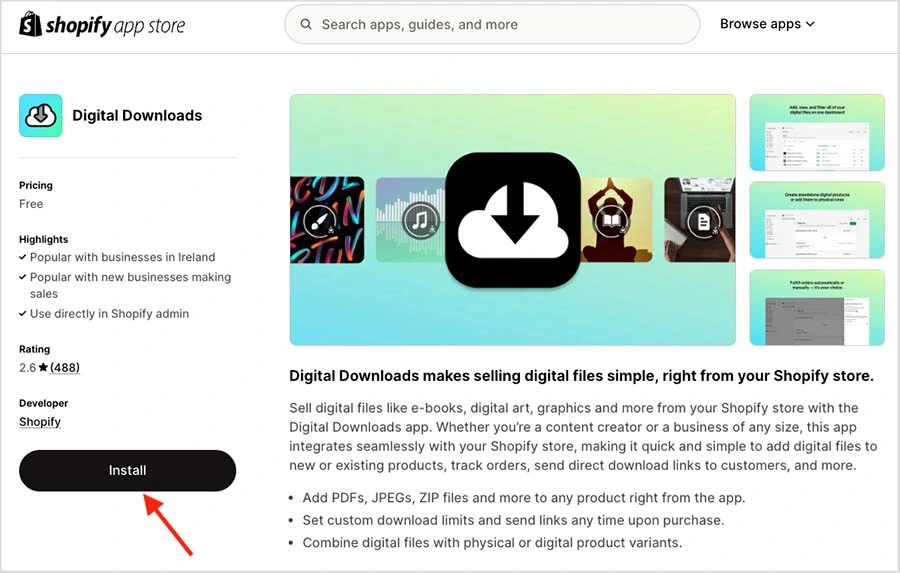
Log in to your Shopify admin and go to the Shopify App Store.
Search for “digital downloads” and browse the available apps.
Click Install on the app you choose and follow the setup prompts.
Once installed, you’ll be able to link your eBook file(s) to your Shopify product listings so customers can download them automatically after purchase.
Most apps allow you to specify whether the download link is sent automatically or manually, giving you control over the fulfillment process.
Start a free trial and enjoy 3 months of Shopify for $1/month
🚀 Start Shopify TrialTrusted by over 2,000,000 businesses worldwide
Upload your eBook to Shopify and add product details
Once your Shopify store is set up and you’ve installed a digital delivery app like Digital Downloads, the next step is to upload your eBook file and configure your product so customers can buy and download it instantly. While Shopify doesn’t natively handle digital files, apps like Digital Downloads make the process clear and manageable. Below is a detailed, step‑by‑step walkthrough.
Create a New Product in Shopify
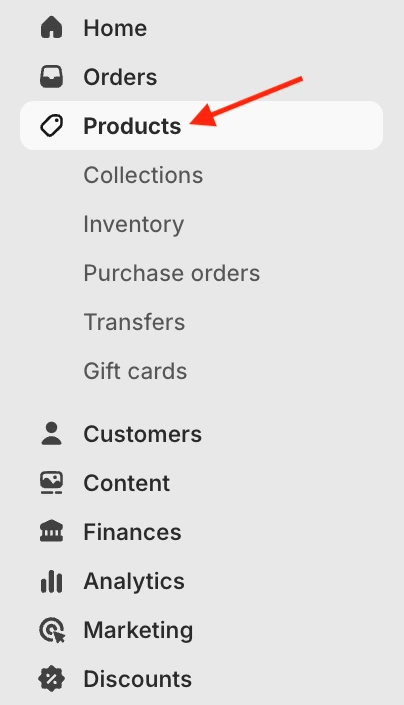
- Log in to your Shopify admin dashboard.
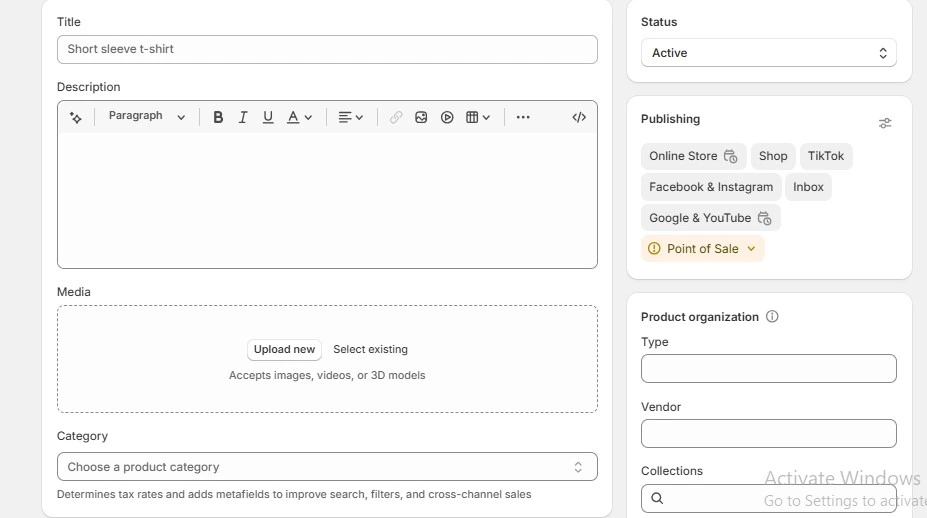
- Go to Products → Add product.
- Enter your eBook’s Title — this should include the main topic and any keywords (e.g., “Ultimate Guide to Photography eBook”).
- Add a compelling description that clearly explains what buyers get and how it benefits them.
- Add your eBook cover image and any promotional visuals.
- Set the price for your eBook.
- In the Shipping section, make sure the option “This is a physical product” is not checked so Shopify recognizes it as a digital item.
- Save the product as a Draft if you want to complete the upload before going live.
Attach the Digital File with the Digital Downloads App
After saving the product, scroll to the product page and click “More actions” (or look for the app prompt).
Choose “Add digital file” — this opens the Digital Downloads app interface.
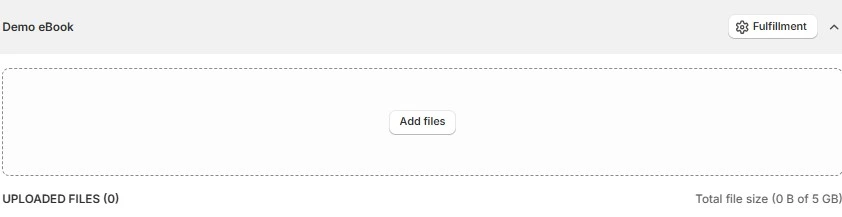
Click “Add files” next to the product or variant you want to upload the eBook for.
Select your eBook file (usually PDF, EPUB, or ZIP bundle containing multiple formats).
Once the file is uploaded, you’ll see it listed under the product in the app.
Click Publish to attach the file to your Shopify product.

Tip: You can upload multiple formats (PDF, EPUB, etc.) if you want to give customers flexible options. Or you can bundle them in a ZIP file.
Configure Download Delivery Settings
Once you’ve done this, it’s important to click the ‘Fulfillment‘ button. Most digital delivery apps provide options for how files are sent after purchase. In Digital Downloads, you can choose:
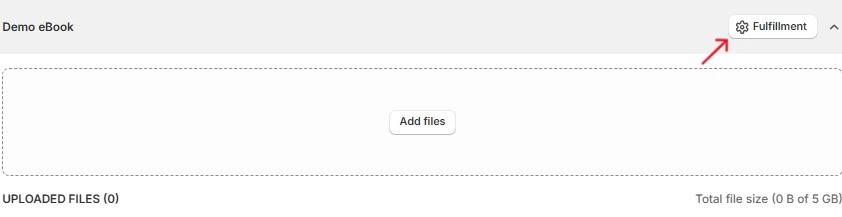
Automatic delivery: Customers receive a download link immediately after checkout — ideal for pure eBook sales.
Manual delivery: You manually send the download link after reviewing the order — useful if you include extra materials or want custom messaging.
Select the option that best fits your workflow — automatic delivery is generally recommended for eBooks for a smooth customer experience.
Publish and Activate the Product
Return to the product settings in Shopify.
Change the product status from Draft to Active so it becomes visible in your store.
Confirm pricing, description, and images one more time.
Click Save.
Your eBook is now fully uploaded, linked to a digital download file, and ready for customers to purchase and download.
Select Your Payment Gateway
After uploading your ebook to your store, the next step is setting up how customers will pay for their purchases. This is one of the most important parts of the store setup process.
Choosing the right payment gateway can greatly improve the overall buying experience for your customers. Shopify lets you accept payments through Shopify Payments or through one of the many third-party gateways it supports. You can select the option that best fits your business and target market.
With Shopify Payments, you can accept a wide range of payment methods. Shopify supports several options, including PayPal, credit cards, debit cards, net banking, and Apple Pay. There are also many reliable third-party payment gateways available if you prefer alternative providers.
Follow these steps to set up a payment gateway in your store:
Open your Shopify store.
Go to Settings.
Select Payments.
Click Choose a Provider.
Select a third-party payment gateway from the dropdown menu.
Complete the required online form.
Click Activate to enable the gateway.
Launch Your Store
Before launching your Shopify store, it’s important to finish the essential setup tasks. Below is a checklist of the key steps you should complete before making your store live. We’ve covered all these (and more!) in our step-by-step guide to creating a Shopify store
Connect a custom domain to your Shopify store
Install a suitable theme
Design and customize your website
Set up and optimize your store navigation
Double-check that all product details are accurate
Add a secure payment gateway
Optimize your store for search engines (SEO)
Set up your email marketing system
Once you’ve completed these steps, review your store carefully and verify that all settings are configured correctly. If everything is functioning as expected, your store is ready to go live.
Start a free trial and enjoy 3 months of Shopify for $1/month
🚀 Start Shopify TrialTrusted by over 2,000,000 businesses worldwide
Marketing Your eBooks on Shopify
Once your eBooks are uploaded and your Shopify store is live, marketing becomes the driving force behind your sales and long‑term success. Unlike marketplaces where visibility is somewhat built‑in, on Shopify you control the entire customer journey — which means your marketing strategy has to actively bring in traffic, engage readers, and convert browsers into buyers. Below are proven strategies to effectively promote your eBooks and grow your revenue in 2026.
Leverage SEO to Attract Organic Traffic
Search engine optimization (SEO) plays a big role in long‑term discoverability. By optimizing your eBook product titles, descriptions, and blog content with relevant keywords like “sell eBooks on Shopify,” “how to sell eBooks online,” and related phrases, you increase your chances of ranking in search engines. Organic search traffic can become a consistent source of book buyers over time.
Use keyword research to identify terms your audience searches for
Include SEO‑friendly descriptions on product pages
Publish related blog posts and guides to attract visitors
Build and Nurture an Email List
Your email list is one of your most valuable marketing assets. Collect email addresses through opt‑ins on your website, offering visitors a free chapter, sample, or lead magnet in exchange for their contact information. Once collected, use email campaigns to:
Announce new releases and special offers
Share exclusive discounts or bundle deals
Send content related to your eBook topic to keep your audience engaged
Email marketing helps turn one‑time buyers into repeat customers and increases your store’s lifetime value.
Promote on Social Media Platforms
Social media gives you a way to connect with your audience, build brand presence, and drive traffic to your Shopify store. Create profiles that align with your niche on platforms like Instagram, Facebook, Pinterest, and TikTok.
Choose content formats that work for your niche:
Share book snippets or quotes
Post behind‑the‑scenes content from your writing or creation process
Showcase reader testimonials and reviews
Create short videos or reels to highlight key takeaways
Consistent posting helps you stay top‑of‑mind with followers and can lead to more clicks and sales.
Offer Free Samples or Previews
Letting potential buyers read a chapter or preview pages builds trust and increases the likelihood they’ll complete a purchase. Free samples act as a low‑risk introduction to your content, allowing readers to evaluate writing style, insights, and value before buying.
You can display previews on product pages, landing pages, or in a lead magnet campaign to grow your email list.
Use Paid Advertising to Expand Reach
Paid ads can help you reach readers outside your organic audience. Consider using:
Facebook/Instagram ads targeting interests related to your eBook topic
Google Ads targeting keywords people search when looking for similar content
Pinterest ads for visual storytelling and traffic
Paid marketing can be particularly effective during book launches or promotional periods.
Leverage Upsells, Bundles, and Offers
Encourage customers to buy more than one book by offering bundles or tiered pricing, such as “Buy 2 eBooks, Get 1 Free” or discounted series packages. This strategy increases your average order value and delivers more value for buyers.
You can also set up post‑purchase upsell offers to recommend related titles after the initial sale.
Collaborate with Influencers and Niche Creators
Partnering with bloggers, niche influencers, or content creators in your topic area can expand your reach. Offer them a free copy in exchange for reviews, social shares, or feature articles. This social proof exposes your eBook to new audiences and builds credibility.
Engage Through Content Marketing
Long‑form content such as blog posts, guides, or articles related to your eBook topic helps establish authority in your niche and improves organic traffic. For example, if your eBook is about productivity, write blog posts with actionable tips that link back to your eBook — turning educated visitors into buyers.
Advanced Tips When You Sell eBooks on Shopify
Once your Shopify eBook store is live and running, you can take your sales and engagement to the next level by implementing advanced strategies that go beyond the basics. These tactics help you boost conversions, automate processes, foster loyalty, and expand your reach—all of which are essential for long‑term success in 2026 and beyond.
Expand Your Product Offering with Bundles and Tiered Offers
Creating multiple product options encourages customers to spend more. Rather than selling a single title, consider:
eBook bundles that group complementary topics together at a discount
Tiered offerings, such as basic vs. premium versions or supplemental workbooks
Time‑limited promotions like holiday packs or introductory launch deals
Bundles and tiered pricing can increase your average order value and appeal to different buyer budgets. Shopify makes bundling easy with built‑in features and apps.
Build and Use an Email Marketing Funnel
Email marketing remains one of the most powerful channels for digital sellers. By capturing visitor emails with lead magnets like a free chapter, checklist, or mini guide, you can nurture leads and convert interest into sales:
Welcome sequences introducing your eBooks
Follow‑ups with exclusive discounts or new releases
Abandoned cart reminders
Using tools like Shopify Email or Klaviyo, you can automate these touchpoints and strengthen your connection with readers.
Offer Free Previews and Lead Magnets
Trust boosts conversions — and giving readers a sample accomplishes just that. Offer a preview of your eBook (such as one or two chapters) freely on your site or landing pages. This lets potential buyers sample the writing style and perceived value before they commit to purchasing, increasing the likelihood of a sale.
Add Upsell Opportunities at Checkout
Upsells at checkout are subtle yet effective ways to boost revenue. When a customer adds one eBook to their cart, suggest related titles, bundles, or workbook add‑ons right before purchase. This tactic leverages buyer momentum and increases average cart size.
Use High‑Quality Visuals and Previews on Product Pages
Even though an eBook is a digital product, presentation still matters. Use professional cover images, mockups showing the eBook on various devices, and preview screenshots. Visual context makes the product feel more tangible and can significantly improve conversions. Tools like Canva or Adobe Express make creating attractive graphics easier.
Encourage Reviews and Testimonials
Social proof builds trust. Encourage customers to leave reviews after purchase — either through follow‑up emails or incentives like a future discount. Displaying these testimonials prominently on your product pages provides reassurance to new buyers and can increase conversion rates.
Run Targeted Promotions and Limited‑Time Discounts
Creating urgency with time‑sensitive offers can prompt hesitant buyers to act. Consider:
Limited‑time discounts (e.g., 24‑hour launch promo)
Seasonal sales (e.g., holiday or back‑to‑school
Early‑bird pricing for new eBooks
Countdown timers and promotional banners are great tools to visually reinforce urgency on your Shopify pages.
Leverage Content Marketing to Drive Organic Traffic
Using content like blog posts, tutorials, or niche guides related to your eBook themes attracts visitors through search and positions you as an authority. For example, if you sell productivity eBooks, writing blog content about time‑management tips can bring readers organically who may then convert.
Explore Paid Advertising and Retargeting
Paid advertising gives you faster visibility than organic methods alone. Platforms like Facebook, Instagram, Pinterest, and Google Ads can be used to target specific reader segments based on interests and behaviors. Retargeting ads — which reach people who previously visited your product page — are particularly effective in converting warm prospects
Final Thoughts: How to Sell eBooks on Shopify
Selling eBooks on Shopify in 2026 offers a scalable, low-overhead way to turn your knowledge, creativity, or expertise into a profitable online business. By preparing your eBook properly, setting up a seamless Shopify store, and implementing effective marketing strategies, you can reach readers worldwide while automating delivery and payments. Success depends on combining high-quality content, optimized product pages, and smart promotional tactics — making Shopify one of the most versatile platforms for digital publishing today.
Others also read
- Best Products to Sell on Shopify in 2026: Trends and Profitable Niches
- Best Shopify Blog Examples You’ll Want to Copy
- Best Shopify T-shirt Stores Examples (2026)
- Best Shopify Dropshipping Suppliers in 2026 (Updated Guide)
- How to Speed Up Shopify Site? (Guide 2026)
- What is Shopify Magic? AI Assistant for Your Stores (2026 Guide)
- 500+ Trendy Gift Shop Name Ideas To Attract Customers
- Profitable Cosmetics and Beauty Products to Sell Online in 2026
- Best Print on Demand Jewelry Suppliers in 2026
- Shopify Collective: What Retailers & Suppliers Should Know!
How to sell eBooks on Shopify — FAQ
1. Can I sell eBooks through Shopify?
Yes. Shopify allows you to sell eBooks using digital download apps like Shopify Digital Downloads, enabling secure file delivery after purchase.
2. What types of eBooks sell best?
Top-selling eBooks include niche non-fiction, self-help, business, technical guides, educational textbooks, and hobby-focused content.
3. Can you sell physical books using Shopify?
Absolutely. Shopify supports both digital and physical products, so you can sell eBooks and print books from the same store.
4. Is selling eBooks profitable?
Yes. With low overhead, instant delivery, and global reach, eBooks can generate high margins and recurring revenue when marketed effectively.
5. How much does it cost to start an eBook business on Shopify?
Startup costs are minimal: Shopify plans start at $25/month, plus optional paid apps or marketing expenses. Digital products have no inventory costs, making it highly cost-efficient.
Need Help? Let’s Build Your Shopify Store the Smart Way With – Stores Automation
Why build alone when you can have a team do it for you? At Stores Automation, we create fully automated, done-for-you Shopify stores that are designed to grow while you focus on profits. No tech stress, no guesswork—just a streamlined system that works for you 24/7.
From store setup to product integration, branding, and automation—we handle everything so you don’t have to.
Call us: 302-204-8244
Email us: info@storesautomation.com
Sign up here and let us take it from there.
Let’s build you a store that runs on autopilot—because your time is better spent earning.