

Table of Contents

If you have ever wondered how to get reviews on Amazon, you are not alone. For Amazon sellers at every level — whether you just launched your first product or you are managing a catalogue of hundreds of ASINs — reviews remain one of the most powerful factors influencing your success on the platform. They affect how high your product ranks in search results, how often it converts browsers into buyers, and ultimately how much revenue your store generates.

The numbers speak for themselves. According to Amify, over 80% of Amazon shoppers take reviews and seller ratings into consideration before making a purchase. And research from Emplicit shows that a private label seller launching a smart home device saw their conversion rate jump from 4% to 11% after accumulating just 100 reviews, 70% of which were verified — and that improvement alone was enough to earn them Amazon’s Choice status.

Despite how critical reviews are, getting them consistently and legitimately is one of the biggest challenges Amazon sellers face. Amazon’s strict policies, evolving rules, and aggressive enforcement against manipulation mean that sellers need to be both strategic and compliant in how they approach review generation.

This guide covers everything you need to know: what Amazon’s rules actually say, which official tools you should be using, and the proven methods that work in 2026 — for brand-new sellers just getting started and experienced operators looking to scale their review count faster.

Learn everything about Amazon PPC advertising in 2026 and how it can boost your book or product sales efficiently.

Why Amazon Reviews Matter More Than Ever in 2026?

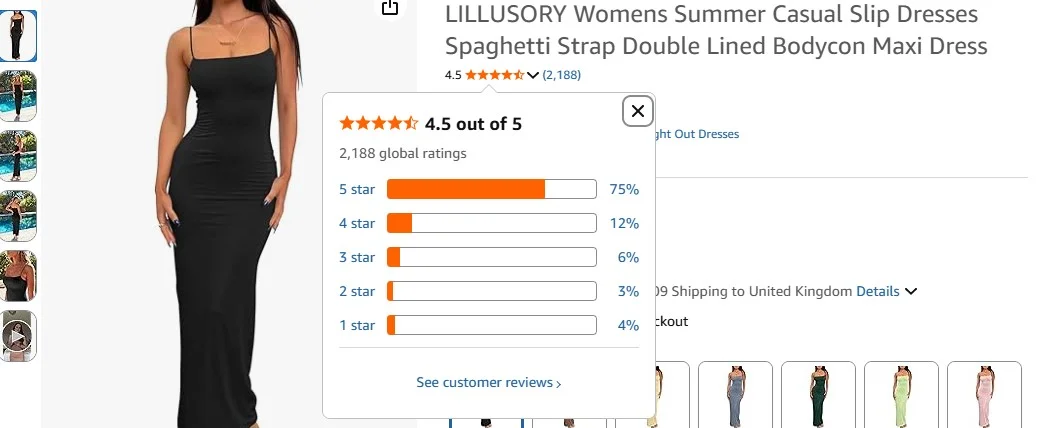
image showing reviews on an amazon store

Amazon reviews have always mattered. But in 2026, their importance has only grown. Here is why every seller, regardless of experience level, needs to make review generation a central part of their business strategy.

The Direct Impact on Conversions

Reviews are not just about social proof — they have a measurable, documented impact on your conversion rate. Well-optimised listings with strong reviews convert at 10% to 15%, compared to the general Amazon average of around 9% to 11%. That difference in conversion rate, when applied across thousands of monthly visitors, translates directly into tens of thousands of pounds in additional revenue.

Even a minor improvement in star rating can have a significant effect. Data from eDesk shows that when a seller’s rating increases from three stars to five stars, conversions increase by 12%.

The Impact on Amazon Search Rankings

Amazon’s A9 algorithm — the engine that determines which products appear at the top of search results — heavily factors in review volume and quality. Products with a higher number of positive, verified reviews signal strong relevance and customer satisfaction, which the algorithm rewards with better visibility. More visibility means more traffic. More traffic, when combined with a good conversion rate, means more sales. This creates a compounding flywheel effect that is extremely difficult for competitors without reviews to break into.

The Social Proof Effect

Buyers on Amazon are sophisticated. They know how to spot a product with few or suspicious reviews. Feedvisor research cited by Pattern found that over 79% of shoppers go to Amazon specifically to check product reviews before making purchasing decisions. An item with 300 four-star reviews will almost always outsell one with 10 five-star reviews, because volume builds trust.

Furthermore, industry benchmarks suggest that successful products need at least 51 reviews to meet consumer confidence thresholds, and 100 or more to achieve competitive positioning in most categories. Electronics and high-consideration purchases often require 150 or more.
Discover how Amazon Merch on Demand in 2026 empowers creators to monetize designs without upfront inventory costs.

Amazon's Review Policies: What You Must Know First!

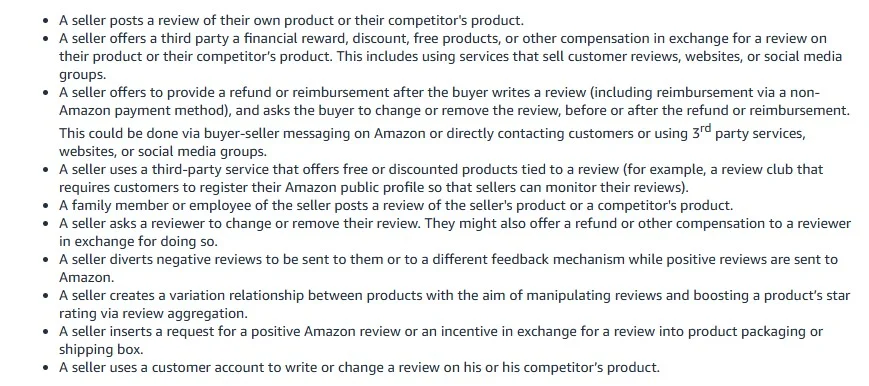
image showing amazon's official review guidelines

Before implementing any review strategy, you need to understand what Amazon allows and what it strictly prohibits. Violating Amazon’s review policies is not a grey area — consequences include listing removal, account suspension, and even legal action.

What Amazon Prohibits

Amazon is unambiguous about the following practices, all of which are strictly prohibited:

  • Incentivised reviews: Offering any form of compensation — discounts, refunds, free products, gift cards — in exchange for a review is a direct violation of Amazon’s Community Guidelines.
  • Review manipulation services: Paying third-party services to generate reviews on your behalf, whether through fake accounts or real buyers who are refunded after reviewing, is banned and actively prosecuted.
  • Review swapping: Participating in Facebook groups, Telegram channels, or other communities where sellers exchange reviews for each other’s products is against Amazon policy.
  • Soliciting only positive reviews: Any messaging that directs customers to only leave a review if they are satisfied, or that steers them away from negative feedback, is a policy violation.
  • Family and friend reviews: Asking people you know personally to review your product — even if they genuinely purchased it — violates Amazon’s guidelines on conflict of interest.

Those are only some of the rules you should follow when looking to acquire more reviews. To avoid misunderstandings, check the extensive list of rules and follow it closely.

The Scale of Amazon’s Enforcement

Amazon is not making empty threats. According to Emplicit, Amazon blocked over 200 million suspected fake reviews in 2022, a figure that rose to 250 million in 2023 before settling back at 200 million in 2024. The company employs a global team of over 15,000 people to investigate flagged reviews, alongside advanced machine learning and deep graph neural network technology to detect manipulation patterns.

Legal consequences are also real. Amazon has pursued civil lawsuits against fake review brokers worldwide and secured at least one criminal conviction — a broker based in China was sentenced to two years in prison in September 2023 following a criminal referral from Amazon.

What Amazon Allows

To be clear, Amazon does allow sellers to request reviews — but only through specific, compliant channels and with messaging that is neutral, non-incentivised, and does not pressure buyers into leaving a specific type of feedback. The methods covered in Section 3 below are all within Amazon’s Terms of Service.

Complete guide to selling on Amazon Handmade, including account setup, product listing tips, and growing artisan sales.

Amazon's Official Review Request Tools

Amazon provides sellers with two primary official mechanisms for requesting reviews. These are the safest options available, and every seller should be using at least one of them consistently.

1. The “Request a Review” Button in Seller Central
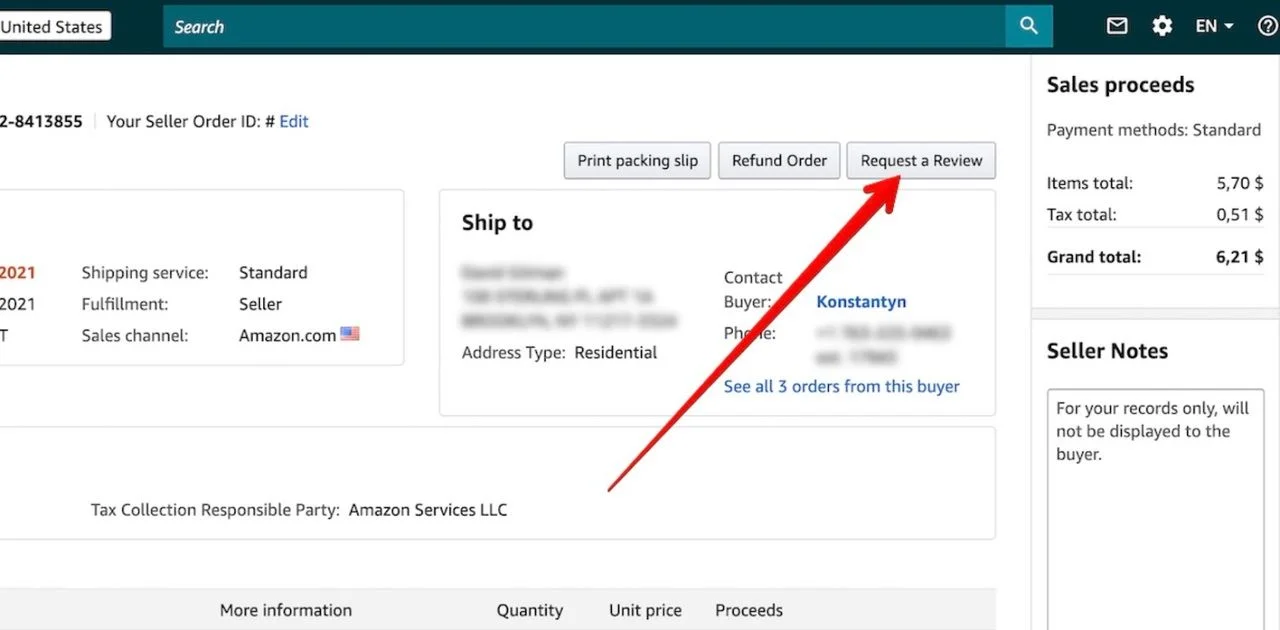
image showing amazon's request a review button

Source: ChannelReply

The Request a Review button is available directly inside Amazon Seller Central on the individual order details page. When clicked, Amazon sends a standardized, pre-formatted email to the buyer on your behalf, asking them to leave both a product review and seller feedback.

Key things to know about this tool:

  • It can be used between 5 and 30 days after the order delivery date
  • The email template is created and controlled entirely by Amazon — you cannot customize the content
  • It is automatically translated into the buyer’s preferred language
  • It is 100% compliant with Amazon’s Terms of Service
  • You can only send one request per order — do not also send a Buyer-Seller Message for the same order, as this violates Amazon’s policy on duplicate requests

Data from eDesk found that using the Request a Review button increased review volume by an average of 52% in the first 15 days of implementation — making it one of the highest-ROI actions a seller can take with zero additional spend.

The main limitation of this tool is that it requires manual action for each order. For sellers with high order volumes, this can quickly become unmanageable. That is where automation tools (covered in Section 7) come in.

2. The Amazon Vine Programme
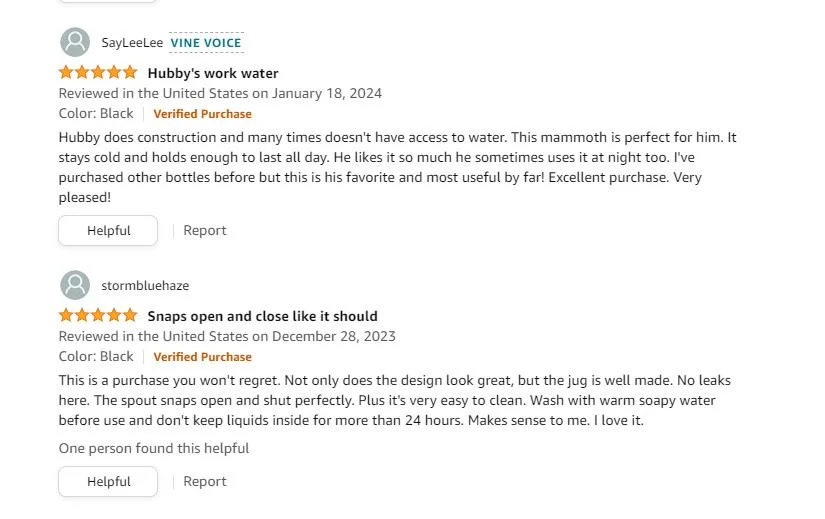
vine voice

For brand-registered sellers, the Amazon Vine Programme is one of the most powerful legitimate tools available for generating high-quality reviews, particularly during a product launch.

Here is how it works: you enrol an eligible product and provide up to 30 free units to Amazon’s network of trusted reviewers, known as Vine Voices. These reviewers are selected by Amazon based on their history of writing detailed, helpful reviews. They test your product and share their honest, unbiased feedback, which is published on your listing with a “Vine Customer Review of Free Product” badge for transparency.

To be eligible for Vine, your product must meet the following criteria:

  • You must have a Professional Seller Account (the $39.99/month plan)
  • Your brand must be enrolled in Amazon Brand Registry
  • The product must be fulfilled by Amazon (FBA)
  • The product must have fewer than 30 published reviews
  • The product must be in new condition with an active listing, title, image, and category

A significant update rolled out in June 2025 allows sellers to receive Vine reviews before a product listing even goes live. This means you can launch a new product on Day 1 already armed with up to 30 authentic, detailed reviews — a game-changing advantage for competitive product launches.

Vine Programme Cost: Amazon charges a flat enrolment fee of approximately $200 per ASIN, regardless of outcome. You also provide free product units and cover associated FBA fees. According to BeBold Digital, 51% of Vine reviews are 5-star, compared to 39% of non-Vine reviews — making it a strong investment for well-made products.

Important caveat: Each ASIN can only be enrolled in Vine once in its lifetime. Do not waste your single enrolment on a product that is not ready — make sure your listing is polished, your product is genuinely good, and your inventory is in place before enrolling

Step-by-step guide to building a professional Amazon storefront, improving brand visibility, and increasing customer engagement.

Proven Methods to Get More Amazon Reviews

Beyond Amazon’s official tools, there are a number of proven, fully compliant strategies that experienced sellers use to consistently generate more reviews. Many of these methods work by improving the customer experience throughout the entire buyer journey — because the best foundation for reviews is always a great product backed by excellent service.

Optimize Your Product Listing to Set the Right Expectations

One of the most overlooked drivers of negative reviews is a gap between what buyers expect and what they receive. If your product listing is not optimized and overpromises or is unclear about dimensions, materials, or functionality, customers who feel misled will leave negative feedback.

Invest in accurate, high-quality product images that show the item from multiple angles and demonstrate scale. Write clear, honest bullet points and descriptions. If your product has limitations, acknowledge them where relevant. Buyers who receive exactly what they expected are far more likely to leave a positive review — and far less likely to leave a negative one.

Use Product Packaging Inserts Strategically (Within ToS)
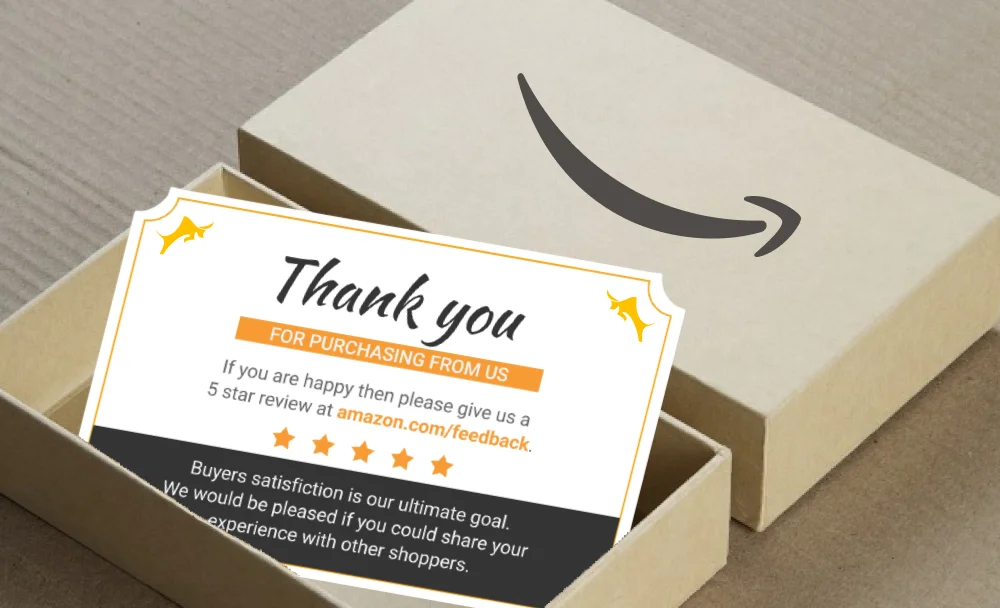
This image is a promotional thank you card included in an Amazon product package

A physical insert included in your product packaging is a legitimate and widely used method for encouraging reviews. The critical rule to follow is that your insert must not incentivise a positive review or offer anything in exchange for leaving feedback.

Compliant inserts typically include:

  • A warm thank-you message from your brand
  • A prompt asking the customer to share their honest experience on Amazon
  • A QR code or short URL linking directly to your product review page
  • Customer service contact details in case of any issue with the product

What inserts must NOT include: any conditional language such as “if you are happy with your purchase, please leave us a review” or any offer of a discount, gift, or free item in exchange for a review. These cross the line into incentivised review solicitation.

Deliver Exceptional Post-Purchase Customer Service

Proactive customer service is one of the most underrated review generation strategies available. Sellers who respond quickly to buyer messages, resolve issues generously, and follow up to ensure satisfaction consistently earn more organic reviews than those who simply fulfil orders and move on.

When a buyer contacts you with an issue, aim to resolve it quickly and without friction. A customer who had a problem and received outstanding service is often more motivated to leave a review — and a positive one — than a customer who had a seamless experience with no interaction at all.

Enroll in Amazon Brand Registry

Amazon Brand Registry is not just a prerequisite for Vine — it unlocks a suite of tools that collectively improve your ability to generate and maintain reviews. These include A+ Content (which improves listing quality and conversion), the ability to use Sponsored Brands ads, access to brand analytics, and the ability to use Vine.

Brand Registry also gives you better tools for protecting your listings from hijackers and counterfeit sellers — both of which can result in negative reviews that damage your ratings through no fault of your own.

Drive External Traffic to Your Listing

Driving traffic to your Amazon listing from outside the platform serves a dual purpose: it increases sales velocity (which Amazon’s algorithm rewards), and it brings in a broader pool of buyers who are more engaged and more likely to leave feedback.

Effective external traffic channels include:

  • Email marketing: If you have an existing email list or customer base, a targeted campaign promoting your Amazon product can drive verified purchases from highly engaged buyers.
  • Social media: Platforms like Instagram, TikTok, and Facebook can be effective for driving product awareness, particularly for visually appealing or demonstrable products.
  • Influencer collaborations: Partnering with relevant content creators who can review your product and link to your Amazon listing brings in buyers who have already been primed to trust your brand.
  • Amazon Attribution: Use Amazon Attribution links when driving external traffic so you can track exactly which channels are converting and optimize your efforts accordingly.

Follow Up Using Buyer-Seller Messaging (Carefully)

Amazon’s Buyer-Seller Messaging system allows sellers to send proactive messages to buyers for legitimate reasons. Requesting a review falls within Amazon’s “Permitted Messages” policy, provided the message:

  • Is neutral in tone and does not request a positive review specifically
  • Does not offer any incentive for leaving a review
  • Is sent only once per order (do not also use the Request a Review button for the same order)
  • Does not include marketing content, promotions, or links to external websites

The ideal timing for a review request message is after the buyer has had sufficient time to use the product — typically 7 to 14 days after confirmed delivery, depending on your product category.

Consistently Sell a Genuinely Great Product

This point may seem obvious, but it is worth stating clearly: no review strategy in the world will consistently generate positive reviews for a poor product. The single most reliable foundation for a healthy review profile is a product that delivers on its promise, arrives in good condition, and meets or exceeds customer expectations.

If you are seeing a high proportion of negative reviews, use them as diagnostic data. Identify the most common complaints, address them through product improvements, update your listing accordingly, and then relaunch with a better product. As MarketplaceOps notes, negative reviews can actually be a valuable tool for identifying unmet customer needs — sellers who act on them gain a real competitive advantage.


What NOT to Do: Black Hat Tactics to Avoid

It is worth dedicating a full section to the tactics you should avoid, because the temptation to cut corners on reviews is real — and the consequences of doing so can be catastrophic for your business.

Buying Fake Reviews

Services that sell fake Amazon reviews — whether through paid accounts, click farms, or coordinated buyer networks — are the highest-risk tactic a seller can engage in. Amazon’s detection systems have become increasingly sophisticated, using machine learning, graph neural networks, and human review teams to identify patterns of manipulation. Getting caught does not just result in review removal; it can lead to permanent account suspension and legal action.

Review Swap Groups

Facebook groups, WhatsApp communities, and Telegram channels where sellers agree to buy each other’s products and leave mutual five-star reviews are directly prohibited by Amazon’s policies. Amazon actively monitors for patterns of cross-seller review activity and has taken action against sellers participating in these schemes.

Offering Discounts or Refunds for Reviews

Even if you ask for an “honest” review while offering a discount, Amazon classifies any conditional incentive as a policy violation. This includes offering a coupon code, a partial refund, or a free additional product in exchange for a review — regardless of how the request is phrased.

Using Unapproved Third-Party Review Services

There are many services marketed to Amazon sellers that claim to generate reviews through “real buyers.” Even when these services use genuine accounts, the practice is considered manipulation under Amazon’s guidelines. Always verify that any tool or service you use is listed in the Amazon Selling Partner App Store and explicitly complies with Amazon’s review policies before using it.

Learn how Amazon Marketing Services helps sellers boost visibility, run targeted ads, and increase conversions with effective advertising tools.

How to Respond to Negative Reviews the Right Way

Negative reviews are inevitable, regardless of how good your product is. What separates successful sellers is not the absence of negative reviews but how they handle them.

Why Responding Matters

When you respond publicly to a negative review, you are not just addressing that one buyer — you are communicating with every future customer who reads that review. A professional, empathetic response that acknowledges the issue and explains how it has been resolved builds trust rather than destroying it. Many buyers actively look at how sellers handle negative feedback before deciding whether to purchase.

Best Practices for Responding

  • Respond promptly — aim to reply within 24 to 48 hours of the review being posted
  • Acknowledge the customer’s experience without being defensive
  • Apologize for any genuine shortfall, even if the issue was caused by shipping damage or a manufacturing defect
  • Offer a clear resolution — a replacement, refund, or direct contact to resolve the issue
  • Keep the tone professional and avoid any language that could be perceived as dismissive or argumentative

Requesting Removal of Fake or Policy-Violating Reviews

If you believe a review violates Amazon’s Community Guidelines — for example, it contains false information, is clearly from a competitor, or is tied to a product the reviewer did not purchase — you can report it to Amazon using the “Report abuse” link on the review. Amazon will investigate and remove reviews that are confirmed to be in violation of its policies.

Be realistic about the success rate of these requests. Amazon will not remove reviews simply because they are negative. Removals are reserved for reviews that genuinely breach policy.

Understand key differences between Amazon 1P and 3P selling models to choose the best approach for profitability and business control.

Tools That Can Help You Get More Amazon Reviews

For sellers managing more than a handful of orders, manually clicking the Request a Review button for each order quickly becomes impractical. The following tools can help automate and optimize your review generation efforts — all within Amazon’s Terms of Service.

Helium 10 — Follow-Up

Helium 10 is one of the most comprehensive Amazon seller tool suites available, and its Follow-Up feature is one of the strongest review automation tools on the market. It allows you to create automated email sequences triggered by order events, with customizable timing and messaging that stays compliant with Amazon’s Buyer-Seller Messaging guidelines. Helium 10 also integrates with Amazon’s Request a Review button for fully automated, policy-safe outreach. Visit: helium10.com

Jungle Scout — Review Automation

Jungle Scout’s Review Automation feature automates the Request a Review button process across all eligible orders in your Seller Central account. Rather than manually clicking the button for each order, you can set Jungle Scout to send requests automatically at your chosen timing within the compliant 5-to-30-day window. It is particularly well-suited for sellers with high order volumes who need a set-and-forget solution. Visit: junglescout.com

FeedbackWhiz

FeedbackWhiz is a dedicated feedback and review management platform that provides advanced email automation, detailed analytics on review request performance, and real-time notifications when new reviews are posted. It gives sellers more granular control over timing and order filtering than the native Request a Review button, while remaining fully compliant with Amazon’s policies. Visit: feedbackwhiz.com

SellerLabs (Feedback Genius)

SellerLabs offers Feedback Genius, a review request automation tool that allows sellers to set up intelligent, rule-based messaging sequences. You can filter by order attributes, product SKU, or fulfilment type, and exclude orders where customers have already reported an issue — reducing the risk of triggering a negative review from an already-unhappy buyer. Visit: sellerlabs.com

A Note on Tool Selection

When evaluating any review tool, always verify that it is listed in Amazon’s Selling Partner App Store or has explicit API authorization from Amazon. Using unapproved automation tools — particularly browser extensions that simulate clicks in Seller Central — carries risk and is not recommended.

Understand Amazon ACoS, how to calculate it accurately, and strategies to optimize ad spend for higher profitability.

Conclusion: How to Get Reviews on Amazon

Learning how to get reviews on Amazon is not about finding shortcuts. The sellers who build the strongest, most sustainable review profiles in 2026 are the ones who focus on delivering genuine value — through better products, clearer listings, faster customer service, and smarter use of the legitimate tools Amazon provides.

If you are just starting out, begin with the basics: use the Request a Review button consistently for every eligible order, ensure your packaging includes a compliant insert, and focus obsessively on product quality and customer experience. If you are a brand-registered seller preparing to launch a new product, enrolling in Amazon Vine as early as possible — ideally before launch — can give you an immediate competitive advantage.

For experienced sellers looking to scale, automated tools like Helium 10 Follow-Up or Jungle Scout Review Automation will save you time while maintaining compliance, and a well-structured external traffic strategy can significantly increase the volume of verified purchases — and therefore the pool of potential reviewers.

Above all, remember that reviews are a reflection of your customer’s experience. Invest in that experience, and the reviews will follow.

FAQs: How to Get Reviews on Amazon

  • What happens if my product has zero reviews — will anyone actually buy it?

Yes, but your conversion rate will be much lower. Shoppers use reviews as a trust signal, so getting your first 10 to 20 reviews as quickly as possible — through Vine, packaging inserts, and the Request a Review button — should be your top priority at launch.

  • Can I get reviews before my product even goes live on Amazon?

Yes. Since June 2025, brand-registered sellers can enrol in Amazon Vine before a listing goes live and receive up to 30 reviews before launch day. Your product must be FBA-eligible and your brand must be enrolled in Brand Registry.

  • My product is getting sales but no reviews — what am I doing wrong?

Most likely you are not asking. Only 1% to 2% of buyers leave reviews voluntarily. Make sure you are using the Request a Review button for every eligible order, including a compliant packaging insert, and sending requests 7 to 10 days after delivery for the best response rate.

  • Does the star rating matter more than the number of reviews?

Both matter. Your star rating forms the buyer’s first impression — anything below 3.5 stars will put most shoppers off. But above 4.0 stars, review volume takes over. A product with 4.2 stars and 500 reviews will typically outsell one with 4.8 stars and 15 reviews.

  • What happens to my Amazon account if I get caught buying fake reviews?

Consequences range from review removal and listing suppression to permanent account suspension and frozen funds. In serious cases, Amazon has pursued civil lawsuits and even criminal referrals. The risk is never worth it.

  • Can a competitor deliberately leave fake negative reviews on my listing?

Unfortunately, yes. Watch for a sudden spike in one-star reviews from accounts with no purchase history on your listing. Report each one via the “Report abuse” link, document the pattern, and contact Amazon Seller Support or escalate through Brand Registry.

  • Is it against Amazon’s rules to include a card in my packaging asking for a review?

No — packaging inserts are allowed as long as they ask for an honest review with no conditions attached. Do not say “if you are happy, please leave 5 stars” and do not offer any incentive. A simple thank-you card with a QR code to your review page is perfectly compliant.

  • Should I launch my product at a low price to get early reviews faster?

A modest introductory discount of 15% to 25% can boost early sales velocity and get more buyers — and therefore more potential reviewers — through the door. Avoid cutting your price too deeply, as it can be difficult to raise later without hurting your conversion rate.

  • Does getting more reviews help me win the Amazon Buy Box?

Indirectly, yes. Reviews improve your conversion rate and sales velocity, which contribute to the overall seller performance metrics that Amazon uses for Buy Box eligibility. FBA, competitive pricing, and account health are the primary factors, but a strong review profile supports all of them.

  • I have a 4.2-star rating — is it actually worth trying to push it higher?

Yes. The jump from 4.2 to 4.5 stars is meaningful — it can improve your conversion rate and unlock Amazon’s Choice eligibility in many categories. Focus on addressing the root causes of your negative reviews and increasing your volume of compliant review requests to gradually move the average upward.

Power Your Brand. Automate Your Growth. Win on Amazon — with Stores Automation

At Stores Automation, we specialize in automating every aspect of your Amazon store, from inventory management to marketing strategies, so you can focus on scaling your business. Our best amazon fba automation services takes the guesswork out of e-commerce by providing expert solutions tailored to your store’s needs.

Whether you’re a seasoned seller or just getting started, we provide personalized done for you store automation that works for you — driving sales and freeing up your time.

Call us at 302-204-8244
Email: info@storesautomation.com
Sign Up to get started.

Let’s turn your Amazon store into a sales powerhouse. Book your free consultation today — and unlock your brand’s full potential with Stores Automation.


    Amazon FBA AutomationeBay DropshippingWalmart DropshippingShopify Dropshipping