
Amazon has become one of the most competitive marketplaces in the world, with millions of sellers fighting for visibility on the same search results pages. Simply listing a great product is no longer enough to generate consistent sales. This is where Amazon Pay Per Click (PPC) advertising plays a crucial role. By using paid ads strategically, sellers can place their products directly in front of high-intent shoppers who are ready to buy.
In this Amazon PPC guide for 2026, we’ll break down everything sellers need to know to get started and succeed. From understanding how Amazon PPC works, to building an effective Amazon PPC strategy, and learning how to optimize PPC campaigns for maximum ROI, this guide is designed for both beginners and experienced Amazon sellers.
Whether you’re launching a new product or scaling an existing brand, mastering Amazon PPC can be the difference between stagnant listings and a profitable, growing business. This guide will help you confidently navigate Amazon advertising and turn ad spend into sustainable sales growth.
Learn how to list and sell used items effectively on Amazon, reach the right buyers, and maximize your earnings in 2026.
What is Amazon PPC?
Amazon PPC (Pay Per Click) is Amazon’s paid advertising system that allows sellers and brands to promote their products directly within the Amazon marketplace. With Amazon PPC, you only pay when a shopper clicks on your ad, not when it’s merely shown—making it a performance-driven advertising model focused on visibility, traffic, and sales.
At its core, Amazon Pay Per Click works on an auction-based system. Sellers bid on keywords (such as product names or search terms), and when shoppers search for those terms on Amazon, ads from the highest-quality and most relevant bids appear in prominent positions. These ads can show at the top of search results, within product listings, or even on competitors’ product pages.
Unlike external advertising platforms such as Google Ads or Facebook Ads, Amazon PPC targets high-intent buyers. These are people already on Amazon, actively searching for products and ready to purchase. That’s why Amazon PPC is considered one of the most effective advertising methods for increasing sales on the platform.
How Does Amazon PPC Works (In Simple Terms)
You choose the products you want to advertise
You select keywords or let Amazon automate targeting
You set a bid (the maximum you’re willing to pay per click)
Your ads appear in relevant search results or product pages
You pay only when a shopper clicks your ad
Amazon also evaluates relevance, conversion potential, and product quality—not just bid amount. This means better-optimized listings can sometimes outrank higher bids, making optimization a key part of any successful Amazon PPC strategy.
Discover how to perform Amazon product research in 2026 to identify profitable products and stay ahead of competitors.
Why Amazon PPC Matters More in 2026
Amazon PPC (Pay Per Click) is no longer optional in 2026—it’s a core requirement for sellers who want consistent visibility, sales, and long-term growth. As Amazon becomes more competitive and ad-driven, relying solely on organic rankings is increasingly risky. Here’s why Amazon PPC matters more than ever in 2026:
Organic Visibility Is Harder Than Ever
Amazon now hosts millions of sellers and constantly adds new private-label and branded products. Even well-optimized listings struggle to rank organically without paid support. PPC gives your products immediate visibility at the top of search results, product pages, and competitor listings—positions organic results may never reach alone.
Amazon’s Algorithm Rewards Advertising
Amazon’s A9/A10 algorithm strongly favors listings that generate sales velocity. PPC helps drive those initial and consistent sales, which in turn improves organic rankings. In 2026, Amazon increasingly treats PPC-driven conversions as a signal of relevance and customer interest, making ads a catalyst for organic growth.
Higher Competition Means Higher Ad Dependence
More sellers are advertising aggressively, driving up competition on high-intent keywords. If you’re not running PPC campaigns, your competitors likely are—meaning they capture traffic that would otherwise be yours. Amazon PPC ensures you remain competitive in crowded niches, especially during launches, peak seasons, and promotions.
Advanced Targeting & AI-Driven Ads
Amazon has significantly upgraded its advertising platform. In 2026, sellers can leverage:
-
AI-powered keyword suggestions
-
Automated bidding strategies
-
Improved audience targeting
-
Placement controls (Top of Search, Product Pages)
These tools make PPC more precise and scalable, allowing sellers to reach buyers with strong purchase intent while maintaining better control over ad spend.
Data-Driven Decision Making
Amazon PPC provides invaluable data—search terms, conversion rates, click-through rates (CTR), and cost metrics—that help sellers optimize listings, pricing, and inventory. In 2026, successful sellers use PPC data not just for ads, but to guide broader business decisions and product strategies.
Faster Product Launches
Launching a new product without PPC in 2026 is extremely difficult. New listings have no sales history or reviews, making them almost invisible organically. PPC accelerates the launch phase by generating traffic, sales, and review opportunities quickly—helping products gain traction faster.
Profitability Through Optimization
While ad costs have increased, smart PPC optimization keeps campaigns profitable. Sellers who understand keyword intent, bidding strategies, and conversion optimization can still achieve strong ROAS (Return on Ad Spend). In 2026, profitability doesn’t come from avoiding ads—it comes from mastering them.
Integrate Shopify with Amazon, sync inventory, automate listings, and boost sales across both platforms with this 2026 guide.
Amazon PPC Ad Types
With Amazon PPC (Pay‑Per‑Click), you can choose from three main ad types:
Sponsored Products
Sponsored Brands
Sponsored Display
Below is a detailed breakdown of each — what they are, who can use them, where they appear, cost/eligibility rules, and when to use them.
Sponsored Products
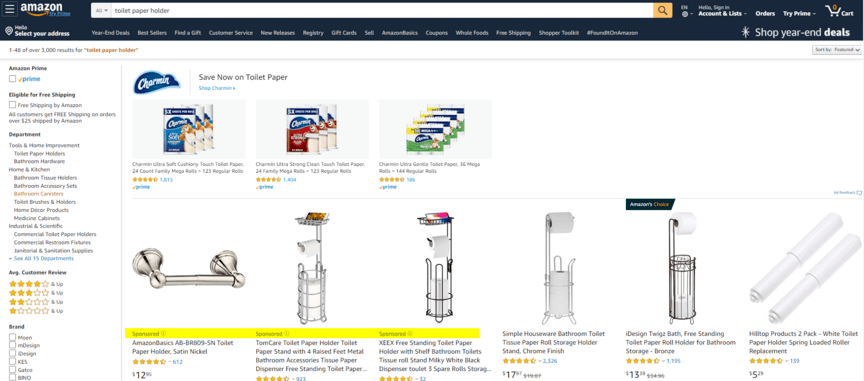
What are Sponsored Products?
Sponsored Products are CPC (cost‑per-click) ads that promote individual product listings. When a customer clicks the ad, they are taken directly to that product’s detail page.
You choose which product(s) to advertise, and you can target shoppers via keywords (manual) or let Amazon automatically target relevant keywords.
Who can use Sponsored Products?
Professional sellers.
Vendors.
Authors using Kindle Direct Publishing (KDP).
Book vendors / media vendors / other eligible vendor types (depending on marketplace).
Also — the product must meet certain conditions:
It must be in an eligible category (not adult, used, refurbished or closed categories) to be advertised.
It needs to be eligible for the Featured Offer / Buy Box (i.e. you must be the seller who owns the “Buy Box”) to run Sponsored Products ads.
Where do Sponsored Products appear?
Sponsored Products ads can appear:
At the top of search results (above organic listings) — highly visible, often high click‑through chance.
Within or alongside the regular search results, mixed among organic listings.
At the bottom of search results, for users who scroll through the page.
On product detail pages — e.g. “related items,” “suggested,” or other placements.
Across devices: desktop, mobile web, and Amazon mobile app.
Additionally, some Sponsored Products ads may appear beyond Amazon’s core site — on certain Amazon‑owned or associated apps or partner sites (depending on region/market) under Amazon’s extended advertising network.
Cost / Budget / How you pay
Sponsored Products is CPC-based — you pay only when someone clicks your ad.
There is no fixed monthly fee or upfront cost.
Minimum daily budget (or equivalent) is low: you can start with as little as US $1/day (or equivalent in local currency).
Actual cost per click (CPC) depends on factors such as competition, keyword demand and category — in competitive niches CPC often is higher; in less competitive niches lower.
When & Why to use Sponsored Products
Ideal when you want direct sales/conversions for a specific product (especially when shoppers already showing search intent).
Great for new listings, seasonal items, or clearance — to get visibility and traffic fast.
Useful for testing keywords — automatic targeting can help discover high‑converting search terms, then you can switch to manual targeting for optimization.
Because of flexible budgets and quick start, it’s easier for beginners / small sellers to start with SP without major upfront investment.
Learn how Amazon FBM works, step-by-step setup, and tips for managing orders efficiently as a seller in 2026.
Sponsored Brands
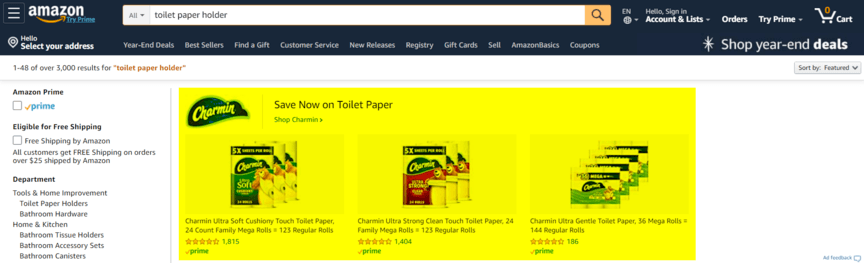
What are Sponsored Brands?
Sponsored Brands allow you to promote multiple products (often up to 2–3 or more) under your brand in a single ad unit. The ad includes your brand logo, a customizable headline, and a selection of products or a link to your brand’s “Store” / custom landing page on Amazon.
When a customer clicks a specific product in the ad, they go to that product’s detail page. If they click the logo or headline area, they may be directed to your Amazon Store or a custom landing page showing your full catalog.
Who can use Sponsored Brands?
Professional sellers who are enrolled in Amazon Brand Registry (i.e. brand‑registered sellers).
Vendors under Amazon’s vendor program — provided their product categories are eligible.
Product listings must be new (not used/refurbished/used/ adult or closed‑category) to be eligible.
Where do Sponsored Brands ads appear?
On Amazon search results pages — typically at the top, but can also show alongside or within search result listings.
On both desktop and mobile devices.
Cost / Budget / Payment
Like SP, Sponsored Brands is CPC-based: you pay only when someone clicks.
There’s no monthly fixed cost — you set a daily (or campaign) budget, and you can adjust it anytime once ads are live.
When & Why to use Sponsored Brands
Best when you have multiple related products or a brand catalog, and you want to showcase your brand + range rather than a single product.
Useful for brand building / brand awareness — especially if you want customers to recognize your brand, see its variety, or browse across your catalog.
Good for cross‑selling / promoting product bundles or related items. For example, if you sell a fitness set (weights, resistance bands, mats), SB helps you show those together.
Beneficial when launching a new brand or product line, to create a branded presence and drive traffic both to individual items and to your brand’s store/landing page.
Learn how Amazon Marketing Services helps sellers boost visibility, run targeted ads, and increase conversions with effective advertising tools.
Sponsored Display
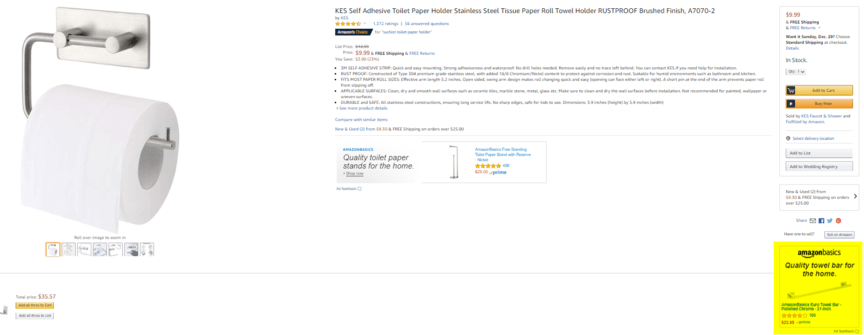
What is Sponsored Display?
Sponsored Display ads allow you to promote individual products, but unlike Sponsored Products or Brands which are keyword‑targeted, Sponsored Display uses behavioral, interest-based, or audience-based targeting. Meaning, Amazon shows these ads to shoppers based on their browsing history, past views, or category interest — not necessarily a search keyword.
These ads may appear on Amazon (product detail pages, review pages, offer listing pages, etc.) and — depending on targeting — off Amazon (on third‑party websites or apps within Amazon’s ad network).
Who can use Sponsored Display?
Professional sellers and vendors enrolled in Amazon Brand Registry (i.e. brand‑registered) are eligible.
Products must belong to eligible categories (not adult, not used/refurbished, not closed categories).
Where do Sponsored Display ads appear?
Depending on your targeting choices, Sponsored Display ads can show:
On Amazon: product detail pages (below bullet points or buy box, or elsewhere), review pages, offer listing pages, etc.
Off Amazon: on third‑party websites and apps that are part of Amazon’s advertising network — useful for remarketing or reaching audiences who left Amazon.
Cost / Budget / Payment
Sponsored Display is also CPC-based (you pay when a user clicks the ad).
There is flexibility in budgeting — you set campaign budget; many advertisers start with modest allocations when testing Display campaigns.
When & Why to use Sponsored Display
Excellent for retargeting: re‑engage shoppers who viewed your product (or similar products) but didn’t purchase. This often helps recover lost conversions.
Good for brand awareness and reach — especially if you want to reach potential customers beyond Amazon or target browsers with interest-based ads.
Works well as a complement to Sponsored Products / Brands — e.g. after someone sees your SP or SB ad but doesn’t buy, Display can remind them.
Useful for products with longer decision cycles (e.g. higher-priced, considered purchases) — gives shoppers multiple exposures over time, increasing chances of conversion.
Understand key differences between Amazon 1P and 3P selling models to choose the best approach for profitability and business control.
Amazon PPC Metrics You Must Consider
Here are the most important metrics (KPIs) to track when running PPC on Amazon — and why each is vital to your success.
Core Metrics: Efficiency & Profitability
ACoS (Advertising Cost of Sale)
What it is: Percentage of ad spend compared to the sales generated by those ads. Formula:
ACoS = (Ad Spend ÷ Ad‑Attributed Sales) × 100%.Why it matters: Helps you measure how cost‑efficient your ads are — lower ACoS means you spend less to make sales.
How to use it:
Compare ACoS against your profit margin / break-even point: if ACoS is below this, ads are profitable.
Use it to decide whether to scale campaigns, lower bids, or pause under‑performing ones.
ROAS (Return on Ad Spend)
What it is: How much revenue you earn per dollar spent on ads. Usually the inverse of ACoS. ROAS = Ad‑Attributed Sales ÷ Ad Spend.
Why it matters: Shows overall return — how profitable your ad spend is. The higher the better.
How to use it: Use ROAS to compare campaigns or products. A high ROAS means ads are generating good returns; low ROAS may mean ads are not worth the spend.
TACoS (Total Advertising Cost of Sale)
What it is: Ad spend compared to total sales (organic + ad‑driven). Formula: TACoS = (Ad Spend ÷ Total Sales) × 100%.
Why it matters: Good to see whether ads are truly growing overall sales (not just shifting existing organic sales to paid). Helps measure whether ads are boosting overall business growth or simply cannibalizing organic sales.
How to use it: Look at TACoS over time — a declining TACoS often signals improving organic lift and sustainable growth.
Audience Engagement & Ad Quality Metrics
These metrics tell you whether your ads are attracting relevant viewers and convincing them to click / buy.
Click‑Through Rate (CTR)
What it is: Percentage of ad impressions that lead to clicks. Formula:
CTR = (Clicks ÷ Impressions) × 100%.Why it matters: Indicates how appealing and relevant your ad is to shoppers. A high CTR means your ad is resonating (good image/title/offer).
Benchmarks: For many categories and ad types, a CTR around 0.3%–0.5% is common.
How to use it: If CTR is low — consider improving creatives (images, titles), ad copy, or refining targeting/keywords.
Conversion Rate (CVR) (or CR)
What it is: Percentage of clicks that convert into a sale. Formula:
CVR = (Orders ÷ Clicks) × 100%.Why it matters: Measures how effective your product listing is — a high CVR means once people click, they tend to buy. Low CVR may point to issues with listing quality, pricing, reviews, or targeting.
Typical Range: Many sellers see CVR around 8%–15%, depending on category, price, competition, etc.
How to use it: Low CVR despite decent CTR suggests listing needs improvement; maybe better images, more compelling copy, or optimized pricing/reviews.
Cost per Click (CPC)
What it is: The average amount you pay for each click. CPC = Ad Spend ÷ Clicks.
Why it matters: Lower CPC (with good CVR) helps improve ad efficiency and profit margins. If CPC is high but conversions low, ads may not be cost-effective.
How to use it: Monitor CPC especially in competitive franchises/categories — adjust bids or target less‑competitive keywords where possible.
Additional Metrics — For Deeper Insights & Strategy
Once you stabilize core metrics, these help you refine strategy, optimize scaling, and understand long‑term performance:
Metric | Why It Matters / When to Use |
Impressions / Reach | How many shoppers saw your ad — helps judge visibility. Low impressions may signal too low bids or limited targeting. |
Orders / Units Sold via Ads | Measures actual sales volume from ads — helpful for assessing volume, not just efficiency. |
Average Order Value (AOV) | Helps determine the revenue per order — high AOV gives more leeway on ad spend. Useful when optimizing for profitability. |
New-to-Brand % | % of buyers who are first-time customers — good to assess customer acquisition and brand growth. |
Cost per Acquisition (CPA) | How much you spend to get a sale — especially useful when launching new products or running promotional campaigns. |
Budget Utilization Rate | Helps avoid overspending — shows whether you’re hitting daily budgets or overspending. |
Which Metric to Prioritize — Depends on Your Goal
Your primary goal (profit, growth, market share, brand building) should dictate which metrics you focus on:
Profitability-focused: Prioritize ACoS, ROAS, CPC, CVR, AOV
Growth / scaling / market share: Focus on Impressions, Reach, Orders, New-to-Brand %, TACoS
Launch or brand‑building: Monitor Impressions, Reach, New-to‑Brand %, Budget Utilization, maybe slightly higher ACoS tolerable
Listing optimization (post-click effectiveness): Focus on CTR, CVR, AOV, Conversion per Click/Order
Practical Advice: How to Use Metrics to Optimize PPC Campaigns
Define clear goals first — Are you seeking profitability, volume, or growth? Your metrics priorities come from this.
Track core metrics daily/weekly — Keep an eye on ACoS, CTR, CPC, CVR, Ad Spend, Sales to catch inefficiencies early.
Use early data for optimization — For example, if CTR is low: improve creatives or refine targeting; if CVR is low: optimize listing (images, copy, price, reviews).
Compare metrics across campaigns/products — Use ROAS, AOV, TACoS, CPA to identify winners and allocate more budget there.
Don’t rely on a single metric — For example, low ACoS might look good but if CVR is dropping or TACoS is increasing, it could signal unsustainable tactics.
Factor in long-term value — Metrics like New‑to‑Brand %, repeat purchases, organic sales uplift (via TACoS) show whether ads are building brand equity beyond immediate sales.
Summary: The Metrics That Define Success
Use ACoS, ROAS, CVR, CPC, CTR to measure efficiency and profitability.
Use TACoS, Impressions, Orders, New‑to‑Brand, AOV, CPA to track growth, reach, and long‑term success.
Always align metrics with your business goals — profit, growth, brand building, or market share.
Combine metrics — don’t judge success on one number alone.
Discover Amazon Attribution, track ad performance, measure conversions, and optimize your marketing strategy for better ROI in 2026.
How Much Does Amazon PPC Cost?
Sponsored Products
Sponsored Products ads are the core PPC format on Amazon, appearing in search results and on product pages (look for the “Sponsored” label). Each click on a Sponsored Product ad costs your bid (or just above the next-highest bid) for that keyword. In practice CPCs can vary enormously –Sponsored Products CPCs from ~$0.05 up to $10 depending on niche competitiveness. In easy niches you might pay only cents per click, while very competitive markets (e.g. popular electronics or appliances) can push exact-match bids above $7. Advertisers control their maximum bid, so actual CPC is often just $0.01 above the next bidder.
Sponsored Brands
Sponsored Brands ads (formerly Headline Search ads) appear at the top of search results and feature a custom headline, brand logo, and up to three products. Because of the premium placement and richer creative, Sponsored Brand CPCs tend to be higher. Industry data show Sponsored Brands averaging $1.10–$2.50 per click on Amazon. For example, in the Beauty category Sponsored Brand CPCs can reach ~$2.30, reflecting intense competition and higher profit margins. Sellers should budget more per click for Brand ads than for basic Sponsored Products.
Sponsored Display
Sponsored Display ads let you retarget shoppers on and off Amazon; on Amazon they often appear below the buy box or in “customers also bought” sections. These ads can be purchased on a CPC or CPM basis. CPCs for Display ads are moderate (around $0.80–$1.60 on average), while CPM (cost per 1,000 impressions) rates usually run $4–$12. Since Sponsored Display is often used for branding and retargeting, it sits between Products and Brands in cost. Sellers pay each time a shopper clicks the ad.
Average CPC by Category
Amazon CPCs differ greatly by category: highly competitive niches cost more, niche products cost less. Some category benchmarks:
- Beauty: CPCs can be high – for example, Sponsored Brand clicks in beauty reach about $2.30 on average. Competition and brand-centric shoppers drive up costs.
- Electronics: Among the priciest niches, often ≥$1.50 per click. Well-known electronic keywords can exceed this range.
- Books & Media: Typically, much lower CPCs (roughly $0.50–$0.80). Lower item prices and fewer bidders mean cheaper clicks.
- Apparel (Fashion): Moderate competition. Expect CPCs in the $0.75–$1.50 range, similar to Home & Kitchen.
- Health & Personal Care: Roughly $0.85 on average. (This includes everyday items; within H&P, some high-demand products like supplements can spike above $1.)
These are ballpark figures. For context, Jungle Scout notes a $0.05–$10 range for Sponsored Products CPC depending on market. In short, low-competition categories (like books or niche crafts) can see CPCs under $1, while top keywords in saturated categories (supplements, electronics, beauty) often run well over $1.
Factors That Influence Cost
Amazon PPC costs aren’t fixed; many factors drive CPC and total spend:
- Competition & Category: More advertisers in a category means higher CPC. In crowded niches, bids must outpace many rivals. For example, supplements, electronics and beauty are so competitive that average CPCs there often exceed $1.50.
- Ad Format & Placement: Premium placements cost more. Top-of-search bids (often set via placement multipliers) can double or triple base bids. Sponsored Brands and Display ads generally have higher CPCs than Products. As the study notes, costs “vary heavily by category, placement and seasonality”, and prime placements push bids up.
- Keyword Targeting: Generic broad keywords command higher CPC than specific long-tail terms. For instance, bidding on “gym apparel” might cost 2–3× more per click than a long-tail keyword like “men’s v-neck exercise shirt”.
- Bidding Strategy: Using Amazon’s automated bidding (dynamic up/down or down-only) will adjust CPC depending on conversion likelihood. Manual bidding gives control but requires more work. In either case, you only pay one cent above the next-highest bid. Aggressive upward bidding or broad match can drive up spend.
- Seasonality: Ad costs rise during peak shopping events. For example, Ad Badger observed 2024’s lowest average CPC of ~$0.95 in October, but it jumped to ~$1.14 by June and spiked to $1.89–$2.12 in November due to holiday demand. Advertiser demand surges on Prime Day, Black Friday, Cyber Monday, and year-end, so plan for higher CPCs during those periods.
- Product Price & Margin: Sellers often use a rule of thumb: set target CPC ≈2.5% of the item price. For example, a $30 product’s “healthy” CPC is around $0.75 (30¢/10% conversion rate at 25% ACoS). High-priced items can tolerate higher CPCs to hit the same ACoS. Low-margin items, however, impose a tighter bid ceiling.
- Listing Quality: Poorly optimized listings convert fewer clicks into sales. To hit your ACoS, you end up needing more clicks (i.e. a higher bid) for each sale if conversion is low. Improving images, copy, and reviews can lower the CPC required for profitability.
- Time of Day: New tools allow bid adjustments by hour. Often, peak buying times (mornings/evenings) have better conversion, so smarter sellers bid up then and bid down off-peak to control CPC.
Budget Expectations by Seller Level
Beginner Sellers: Start with a small budget and ramp up. Many novices begin at $5–$10 per day (roughly $150–$300/month) to test keywords and gather data. This “training” spend is low-risk and lets you identify profitable search terms.
Intermediate Sellers: As campaigns prove effective, budgets typically grow to $50–$100 per day (around $1,500–$3,000/month). This level drives significant traffic without overspending. Jungle Scout recommends $50–$100/day for a basic brand campaign once you see positive ROI.
Advanced/Established Sellers: Successful brands often invest thousands per month in ads. Budgets of $5,000+ per month are common in competitive categories. Some benchmarks suggest a minimum of $5k monthly just to stay visible in hot niches. On the high end, mature sellers may spend tens of thousands per month, especially if they run multiple campaigns or use external DSPs. In general, smaller sellers spend “a few hundred to a few thousand” monthly, while enterprise brands allocate “tens of thousands”. Always scale spend to meet your sales and ROI goals. If campaigns are profitable, gradually raise daily budgets; if you hit unprofitable spend, pause and adjust bids or keywords.
Amazon PPC Auction Mechanics
Amazon PPC uses a second-price auction. When you bid on a keyword, you set a maximum CPC, but you actually pay only $0.01 more than the next highest bid. For example, if you bid $3.00 on “wireless earbuds” and the next highest bid is $1.00, you pay just $1.01 for that click. This keeps costs efficient – you rarely overpay by a large margin. Amazon also shows “suggested bids” for keywords (based on recent winning bids). Bidding the suggested amount will typically earn one of the top ad positions, but savvy sellers may bid below that to improve ROI.
Because of the auction, timing and competition matter. If few sellers are bidding, CPC stays low; if many are bidding (or if your competitors target top-of-page), CPC rises. Using bid multipliers for Top-of-Search can increase your maximum by up to 900%, so ensure those adjustments reflect real-world results. In short, the auction system means higher bids and more bidders = higher CPC, and you only pay what’s needed to beat your competition by the smallest amount.
Discover how Amazon Merch on Demand in 2026 empowers creators to monetize designs without upfront inventory costs.
How to Get Started With Your First Amazon PPC Campaign
Pick the products you want to promote
Your first step is choosing which items you’ll include in your ads. Whether you’re launching Sponsored Products, Sponsored Brands, or Sponsored Display campaigns, you’ll typically select a handful of products to feature. For Sponsored Brands specifically, think about how the products complement each other to encourage more clicks and conversions.
A few things to consider when choosing your products:
Sales performance, rankings, and demand
For instance, you might highlight a best-selling item in a Sponsored Brands ad to increase brand exposure. On the other hand, you could use Sponsored Products to help a new, low-visibility item gain traction.
Conduct keyword research
After choosing your products, the next step — for manual campaigns — is finding the keywords you want to target. Amazon gives you two options: automatic and manual targeting. Automatic campaigns let Amazon select relevant keywords based on your product listing.
Manual campaigns, however, require you to choose the keywords yourself. Amazon suggests starting with automatic targeting to gather initial data and then transitioning into manual campaigns as you learn more.
If you prefer to find keywords on your own, you can use keyword tools like Keywords Everywhere, Sonar, or similar Amazon-focused research platforms. These tools show helpful metrics such as monthly search volume, estimated CPC, and keyword competitiveness.
When selecting keywords, make sure they align with your product and the shopper’s intent. For example, if someone searches for “wooden toilet paper holder” but your item is metal, that keyword would not be a good fit for your campaign.
Optimize Your Product Listings
Before you create ads, ensure your product listing is fully optimized. Your title, bullet points, description, images, and backend keywords should be clear, complete, and keyword-rich. High-quality photos and compelling copy answer buyer questions and improve conversion rates. In fact, a well-optimized listing “improves your ad relevance and conversion rates”. In contrast, a common beginner mistake is to skip listing optimization – driving ads to an unprepared page only wastes spend.
Choose an ASIN that is eligible for ads (e.g. Buy Box eligible with no policy violations) and has some sales history or clear demand. For your first campaign, you might focus on one strong SKU or a small group. Also check your inventory: don’t run ads on an item low on stock, or your ads will simply pause if you run out. Finally, set profit expectations up front – compute your product’s profit margin and estimated break-even ACoS (advertising cost of sale). This will help guide your bid levels and budget.
Create a Sponsored Products Campaign
Log in to Seller Central and go to the Advertising tab. Open Campaign Manager and click Create campaign, then select Sponsored Products. Give your campaign a descriptive name (e.g. “Blue Widgets – Launch Campaign”) so you can identify it later. Add the product(s) you want to advertise – either one ASIN or a small ad group of similar items. Once you’ve selected the ASIN(s), you’ll set campaign-level details:
Budget and Dates:
Set a conservative daily budget to start (for example, $10–$30/day is common for beginners). This controls your maximum spend per day. You can run the campaign indefinitely or set an end date. Make sure the start date is “today” so the campaign launches immediately.
Campaign Duration:
Plan to run the campaign at least 7–10 days to gather meaningful data. The guide recommends a brief test period of about one week before making big changes.
Additional Settings:
You can optionally set an end date, and Amazon may allow advanced settings (e.g. dynamic bidding rules). For now, you can leave most advanced options at default if you’re a beginner.
Once these settings are defined, launch the campaign. Amazon’s support doc summarizes the process: “Select the products you want to advertise, choose your targeting, set your budget and bid, then launch”.
Define Targeting: Automatic vs. Manual
Amazon offers two targeting modes for Sponsored Products:
Automatic Targeting:
Amazon’s algorithm chooses relevant search terms and products on your behalf. This is ideal for a first campaign, as it requires no upfront keyword research. Auto campaigns use default strategies (like “close match” and “loose match”) to match your ad to shopper searches. Official guidance suggests starting with an automatic campaign to “learn how your product is being discovered”. Let the auto campaign run for ~2 weeks, then review the search term report to see which queries converted.
Manual Targeting:
You specify exactly which keywords or products to target. Manual keyword targeting lets you bid on specific search terms (using Broad, Phrase, and Exact match types). Manual product targeting lets you target competitor ASINs or entire categories (so your ad appears on their detail pages or related search results). Manual gives you more control but requires more setup.
Recommendation:
Many experts advise running both. For your first run, start with an automatic campaign to gather data on which keywords and products resonate. Then, after ~1–2 weeks, use the automatic campaign’s search term report to identify top-performing search terms and ASINs. You can add those into a manual campaign with higher bids. Amazon’s docs say automatic targeting “is a great supplement to manual campaigns” and that you should “let your automatic campaign run for about two weeks before creating a manual campaign”. In practice, launch an auto campaign first, then spin up manual campaigns (keyword-based or product-based) once you have some data.
Keyword Match Types (Manual Campaigns)
When creating a manual keyword campaign, choose one of three match types:
Broad Match:
Ads can appear for searches that include any combination of your keywords (including synonyms or related terms). This gives wide exposure. Example: The keyword “sneakers” (broad) could match “canvas sneakers,” “athletic shoes,” “trainers,” etc.
Phrase Match:
Ads appear only for searches containing the exact keyword phrase in order (though there can be extra words before/after). This narrows reach to more specific phrases.
Exact Match:
Ads appear only when the search term is exactly your keyword or a close variant. This is the most restrictive but ensures very tight relevance.
It’s best to test multiple match types for your high-priority keywords. For example, add a keyword in broad, phrase, and exact match with different bids. As a rule of thumb, set highest bids on Exact, a bit lower on Phrase, and lowest on Broad. Testing different matches for ~1–2 weeks will reveal which performs best; you won’t “bid against yourself” by using multiple match types for the same word.
Select Keywords and Set Bids
For manual campaigns, you’ll need an initial keyword list. You can use Amazon’s suggested keywords for your product, or tools to find relevant terms. Focus on keywords highly relevant to your product’s features and use cases. Include both generic terms and some long-tail ones. Don’t forget branded keywords (your own brand or closely related brands) as a defensive strategy if competitors might bid on them.
Next, set your bid (max cost-per-click) for each keyword. A good starting point is to use Amazon’s suggested bid, or a fraction of it if you want to be conservative. Remember your break-even ACoS: if you know how much profit you make per unit, you can compute how high you can bid while still breaking even on sales. Keep bids lower if you have a tight margin. Monitor the Suggested Bid feature when setting up your manual campaign – these are based on recent auction data.
Also, plan for negative keywords. Even early on, you can add negatives to avoid irrelevant traffic. For example, if you sell men’s hiking boots, add “women’s,” “kids,” or “cheap” as negative keywords to prevent your ad showing on those unrelated searches. Negative keywords help stop wasted clicks and improve overall ad efficiency.
Budgeting and Launching Your Campaign
Before launching, double-check that you have: chosen the correct products, defined targeting (auto or manual), entered your keywords and bids, and set budget/date settings. When you click Launch, your ads will become eligible to start running immediately.
Keep the budget modest for this initial run. Experts recommend “set a daily budget of $10–30 and monitor results for 7–10 days”. Another expert tip: treat the first ~7–10 days as a test phase to gather data on clicks, spend, and early sales. Don’t panic if performance is low at first; Amazon’s A9 ranking and AI systems take time to learn.
Do not pause or cut the campaign too quickly. Instead, let it run for at least a week unless budget exhaustion or critical issues occur. During this phase, monitor impressions and clicks daily. If you see zero impressions after a couple of days, you may need to raise bids or check targeting.
Monitor Performance and Optimize
As soon as the campaign is live, check it frequently (daily or every few days) to ensure everything is running smoothly. Look at the key metrics: impressions, clicks, CTR (click-through rate), conversions, and ACoS (Advertising Cost of Sale). Use Amazon’s Campaign Manager or Seller app dashboards for this.
After the initial test period, download the Search Term Report. This report shows which actual customer searches triggered your ads and led to clicks or sales. Identify the top-performing search terms (high clicks and sales) and the poor performers. Then take action:
Add Winning Terms:
For an automatic campaign, copy the best search terms into a new manual campaign and bid more aggressively on them. For manual keyword campaigns, you can raise bids on keywords that are performing well (to win more impressions).
Pause/Negate Losing Terms:
If a keyword or search term consistently gets clicks but no conversions, lower its bid or add it as a negative keyword to prevent waste. Likewise, in product-targeting campaigns, remove or exclude poorly performing ASINs.
Adjust Bids:
Increase bids on keywords/ASINs that are selling profitably; decrease bids or pause those with poor ACoS. A common strategy is highest bids on Exact match winners, lower on Phrase, lowest on Broad.
Refine Targeting:
You may create new campaigns (or ad groups) for different match types. For example, one campaign might use broad-match for discovery, while another uses exact-match for your best keywords. This lets you manage budgets and bids more precisely.
Repeat this optimization cycle regularly. Effective PPC is an ongoing process: “Your top-performing keywords can shift dramatically… review the keyword data regularly”, then reallocate budget to the proven winners. Over time, you’ll build out a set of high-converting keywords and weed out the losers.
Discover how to sell on Amazon without holding inventory, and start your business in 2026.
How to Calculate Your PPC Budget for Amazon?
Setting a PPC budget on Amazon is crucial, especially if you plan to advertise multiple products. A clear budget helps you track performance and measure your return on investment. Here’s a step-by-step guide:
Define Your Advertising Goals
Before creating a PPC campaign, clarify what you want to achieve. Your goals will influence your budget, bidding approach, and ad type. For example, if you’re promoting a single product, decide how many sales you aim for and which type of ad fits best.
Research Costs and Competition
Keyword costs vary by industry and competition. Investigate the average bids for keywords related to your product and examine the types of ads your competitors are running. This will give you a realistic idea of what to expect.
Calculate a Daily Budget
Using the information from your research, determine how much you can spend per day. A simple formula is:
Daily PPC Budget = (Target Daily Sales × Target ACoS) ÷ 100
Target Daily Sales: The amount of sales you aim to generate each day through ads.
Target ACoS (Advertising Cost of Sales): The percentage of sales you’re willing to spend on advertising.
Example:
If your goal is $500 in daily sales and your target ACoS is 20%:
Daily PPC Budget = ($500 × 20%) ÷ 100 = $100
This means you should allocate $100 per day to your campaigns.
Factor in Profit and ROI
After setting an initial budget, refine it based on profit margins, conversion rates, and expected ROI. Depending on how much you’re willing to spend and the calculations for these factors, you may need to adjust your goals.
Time Your Campaigns Strategically
Launching ads around holidays or seasonal trends can increase sales. Make sure your product is relevant to the event so the campaign feels natural and not forced.
Monitor Campaign Performance
Keep a close eye on your ads once they are live. Use Amazon’s reporting tools to track spending, clicks, impressions, and conversions. Regular monitoring helps you make informed adjustments.
Balance ACoS with Profitability
It’s not just about setting a daily budget; you also need to ensure your campaigns remain profitable.
A lower ACoS (10–15%) helps maximize profit.
A higher ACoS (20–30%) can increase visibility and sales.
Continuously review your campaigns and adjust bids, targeting, or product listings to maintain a balance between sales and profitability.
Adjust Your Budget and Strategy as Needed
Amazon PPC requires ongoing management. You’ll need to adapt your budget and bidding strategy based on results, market trends, and competitor activity. Staying flexible is key to maintaining revenue and staying competitive.
Learn step-by-step how to create an Amazon Storefront in 2026, boosting brand visibility and driving more sales.
Effective Strategies to Lower Amazon PPC Costs
Running ads on Amazon can get expensive — but with smart strategy, you can cut costs significantly without sacrificing sales. Below are the most effective techniques to reduce ad spend, improve efficiency, and boost return on investment (ROI).
Strategy 1: Optimize Listing & Product Page First
Your ads can only work as well as your product listing converts. A well‑optimized listing dramatically reduces wasted clicks and lowers your cost per sale (ACoS).
What to do:
Use strong, relevant keywords in your title, bullet points, and product description — especially high‑volume phrases that match shopper searches.
Ensure high‑quality images, including lifestyle or in‑use shots, plus clear benefit‑focused copy. These help improve conversion rate after click, turning traffic into sales.
If you’re brand‑registered, consider using A+ Content (Enhanced Brand Content): better visuals + persuasive content often lead to higher conversion and lower ad costs.
Why it helps: Better listing → higher conversion rate → fewer wasted clicks → lower ACoS. This foundational step amplifies all downstream PPC optimizations.
Strategy 2: Use Smart Campaign Structure — Focused, Tight, Organized
How you structure your campaigns/ad groups can make a big difference in efficiency. A clean, focused structure helps you control spend, track performance, and optimize precisely.
Best practices:
Single‑Theme Ad Groups (STAG): Instead of lumping many unrelated keywords together, group closely related keywords around a common theme or product. This improves relevance and reduces wasted spend.
Separate high‑performing vs low‑performing products/keywords: Avoid mixing winners and underperformers. This allows you to allocate budget and bids more strategically.
Pro Tip: Start with small, tightly themed ad‑groups when you’re scaling or seeing mixed performance. Expand only once you identify proven winners.
Strategy 3: Use Long‑Tail & Buyer‑Intent Keywords
Generic keywords are expensive and often competitive — long‑tail keywords usually have lower cost‑per-click (CPC), lower competition, and attract shoppers closer to purchase intent.
Implementation tips:
Include long‑tail keywords that describe exact use or specifics of your product (e.g. “men’s waterproof trail running shoes size 11” vs just “running shoes”).
Focus on “bottom-of-the-funnel” (BOFU) terms — keywords with high purchase intent — which convert better than broad general searches.
Why it helps: Lower CPC, higher conversion probability, more efficient spend — meaning more profit per ad dollar.
Strategy 4: Aggressively Use Negative Keywords & Exclude Irrelevant Searches
One of the easiest, most effective ways to cut wasted spend is to block unwanted search terms. Negative keywords help ensure only relevant shoppers see your ad.
How to use negative keywords:
Regularly review your Search Term Reports to find queries with many clicks but no sales — these are prime candidates for negative exact or phrase match.
Exclude irrelevant traffic — e.g. mismatched categories, “used/refurbished,” or unrelated qualifiers like “cheap,” “DIY,” etc.
Outcome: Reduces wasted clicks, improves conversion rate, and lowers overall ad spend.
Strategy 5: Smart Bidding — Mix Manual + Automated, Use Dynamic & Time-Based Adjustments
Rather than blindly bidding high, use smart bidding strategies to optimize ad spend efficiency. A mix of manual control and automated flexibility tends to work best.
Tactics to apply:
Dynamic Bids – Down Only: Let Amazon lower bids when conversion likelihood is low — good for testing or less‑proven keywords.
Manual Bids on High Performers: For keywords with proven conversion history, you may manually bid higher to capture more traffic.
Time‑based bidding / scheduling: If your data shows specific hours or days perform better (e.g. evenings, weekends), increase bids or budgets during those periods, reduce them during low‑activity times.
Pro Tip: Revisit bids every 1–2 weeks — don’t “set and forget.” Small, incremental bid adjustments based on performance often produce the best long-term ROI.
Strategy 6: Monitor & Analyze Performance — Then Refine Continuously
Consistent tracking and optimization is key to lower PPC costs. Without data review, even the best campaign setup can become wasteful.
What to monitor:
Search Term Report: reveals which search queries lead to clicks/sales — helps decide which to keep or turn to negative.
Core Metrics (ACoS, CPC, CTR, Conversion Rate): Analyze which keywords/products drive efficient performance and which drain budget.
Performance Segmentation: Group keywords/products into “high-performers,” “average,” and “underperformers.” Adjust bids and budget accordingly — invest more in winners, pause or lower bids on poor performers.
Routine: Make performance review a regular habit (weekly or bi‑weekly). PPC optimization is ongoing — not a “set and forget” game.
Common Pitfalls & What to Avoid
| Mistake | Why It Costs You | What to Do Instead |
| Running ads with a poorly optimized listing | Low conversion → wasted clicks → high ACoS | Optimize title, images, bullets, description before ads |
| Using generic, broad keywords only | Expensive clicks, low purchase intent | Focus on long-tail & BOFU keywords with high buyer intent |
| Ignoring negative keywords | Ads appear for irrelevant searches → wasted clicks | Regularly review search reports and add negatives |
| Treating ad setup as “one & done” | Market and buyer behaviour changes → performance drops | Make bid & keyword reviews a regular habit |
| Not segmenting campaigns / ad groups | Poor control over budget and performance, leads to inefficiency | Use STAG / focused ad groups and separate winners vs losers. strategy |
Learn proven strategies to optimize your Amazon listings, improve visibility, and increase conversions for long-term sales growth.
Conclusion: Amazon PPC
Launching and managing Amazon PPC campaigns in 2026 is no longer optional — it’s essential for visibility, sales, and brand growth. From setting up your first campaign to optimizing keywords, bids, and budgets, every step requires careful planning and data-driven decisions.
By preparing a fully optimized listing, choosing the right products, leveraging automatic and manual targeting, and continuously monitoring and refining your campaigns, you can maximize ROI while minimizing wasted spend. Effective strategies — like using negative keywords, focusing on long-tail high-intent terms, and structuring campaigns smartly — help lower costs and improve efficiency over time.
Ultimately, successful Amazon PPC isn’t about spending more; it’s about spending smarter. Start small, gather data, optimize relentlessly, and scale strategically. With patience, diligence, and a focus on performance, your campaigns can drive sustainable growth and give your products the visibility they deserve in 2026 and beyond.
FAQs: Amazon PPC
What exactly is Amazon PPC?
Amazon PPC (Pay-Per-Click) is an advertising model where sellers pay a fee each time someone clicks on their ad. It allows products to gain visibility in search results, product pages, or other placements, helping drive traffic and sales.
Which types of Amazon PPC campaigns can I run?
Amazon offers three main PPC campaign types:
Sponsored Products: Promote individual products.
Sponsored Brands: Highlight multiple products and your brand.
Sponsored Display: Target shoppers based on their browsing or purchase behavior.
Can Amazon PPC actually generate profits?
Yes, when campaigns are set up and optimized properly. Profitable PPC depends on choosing the right keywords, optimizing listings, managing bids effectively, and continuously analyzing performance to reduce wasted spend.
What is a reasonable daily or monthly budget for starting Amazon PPC?
For beginners, a daily budget of $10–$30 is typical for initial campaigns. Monthly budgets depend on your goals and product costs, but starting small and scaling based on performance is the safest approach.
How do different bid strategies influence PPC costs, and which one should I use?
Bid strategy determines how much you’re willing to pay per click. Choosing the right approach—automatic, manual, or dynamic bids—affects cost efficiency. Beginners often start with automatic or conservative bids, then optimize based on data from performance reports.
What are negative keywords, and how do they help reduce PPC spending?
Negative keywords prevent your ads from showing for irrelevant searches. By excluding low-converting or unrelated terms, you avoid wasting money on clicks that won’t generate sales, lowering your overall ACoS.
How should I plan my Amazon PPC budget effectively?
Budget planning starts with understanding your product profit margins, break-even ACoS, and campaign goals. Begin with modest daily budgets, monitor performance closely, and adjust your spending as you identify high-performing keywords and campaigns.
Power Your Brand. Automate Your Growth. Win on Amazon — with Stores Automation
At Stores Automation, we specialize in automating every aspect of your Amazon store, from inventory management to marketing strategies, so you can focus on scaling your business. Our Done-For You Amazon Store service takes the guesswork out of e-commerce by providing expert solutions tailored to your store’s needs.
Whether you’re a seasoned seller or just getting started, we provide personalized automation that works for you — driving sales and freeing up your time.
Call us at 302-204-8244
Email: info@storesautomation.com
Sign Up to get started.
Let’s turn your Amazon store into a sales powerhouse. Book your free consultation today — and unlock your brand’s full potential with Stores Automation.